Following our first ever Assistive Technology Week in 2025, the wheels are now in motion for ATW 2026 at Sense College Loughborough. The event, which is due to take place from 20 – 24 April 2026, will give our students, staff, parents & carers and local community another opportunity to increase their awareness and understanding of available assistive technologies.
While our first ATW gave attendees an introduction to assistive technology devices and software, this year’s event will focus on four key themes: 3D printing, AI, transition from college to home, and virtual reality. We are currently contacting a number of organisations who we hope will take part in our Assistive Technology Week, either in-person or virtually.
We are looking forward to being able to share more information about the event soon.
The service recipient is a 29-year-old law student.
On 7 October 2023, he was called up for reserve duty and joined the fighting in the Gaza border region. On 8 October 2023, he was injured by shrapnel and completely lost his vision. He spent an extended period in a rehabilitation unit.
During hospitalisation, he began receiving initial rehabilitation services, including orientation and mobility training, white-cane use, and smartphone accessibility skills. After being discharged, he joined a technological training program in Migdal Or’s vocational rehabilitation unit, where he began learning computer accessibility skills such as touch typing, screen-reader use, and keyboard shortcuts to support independent functioning.
In parallel, he continued rehabilitation aimed at strengthening his smartphone skills and using dedicated accessibility apps to improve daily independent functioning.
At a certain stage, he independently chose to stop the rehabilitation process, stating that he no longer felt it was necessary. At the same time, he increasingly relied on an assistant (usually his partner) for mobility and orientation, to the point that he stopped using the white cane and other functional techniques.
At the start of his technological training, he demonstrated persistence and motivation despite understandable frustration caused by the need for intensive practice. However, after taking a two-month break for his law internship, he had difficulty returning to consistent training and practice. As a result, it was decided to discontinue the program, and the rehabilitation process was halted before achieving its full potential.
Analysis
Two key issues emerged in this case:
1. Stage of acceptance of disability
It appears that at the time he arrived at Migdal Or, the service recipient was not yet ready to commit to a structured process intended to strengthen his functional independence following the loss of vision. In our professional assessment, rehabilitation can be renewed successfully once he demonstrates readiness, insight, and an understanding of what is required to rebuild independent functioning and reduce reliance on others.
2. Influence of support services
Rehabilitation authorities such as the Ministry of Defence provide extensive support mechanisms, including high assistant allowances, multiple personal assistants, and various forms of functional support and volunteers. While these services are vital, in some cases they may unintentionally delay the development of independent functional skills. When support becomes a substitute for rehabilitation rather than a bridge toward independence, the individual’s potential to achieve full functional ability is limited.
This case highlights the importance of ongoing collaboration between all rehabilitation bodies to ensure a holistic approach and a comprehensive plan tailored to the individual’s personality, stage of disability acceptance, needs, and abilities.
Current status
He is currently preparing for the Bar examination.
If you would like to watch more about Matan’s story, below is a short news interview (YouTube). The film is in Hebrew. You may be able to switch on English subtitles using YouTube’s subtitle/CC settings, although the translation may be imperfect and may include some inaccuracies. The video focuses on Matan’s rehabilitation journey and his resilience as he adapts to life after losing his sight.
I returned home from work and at some point after 8pm I fell backwards down my stairs, hitting my neck on the radiator and knocking myself unconscious. The alarm was not raised until after 9am the next day when I failed to pick up my colleague from work. She contacted my boss who lived in the next village, who came to the house with a friend who had a key and they found me trapped behind my radiator unconscious. They contacted the ambulance service but was told it would take 6 hours minimum. After explaining what had happened, an air ambulance was sent instantly and I was airlifted to Heath Hospital in Cardiff.
After several tests and scans the doctors performed an operation to try and relocate two discs (C5-C6) that had moved forward and was pressing on my spinal cord. During the operation my blood pressure dropped so they had to finish prematurely to save my life. I still had no comprehension as to the damage that I had done. I was in the intensive care unit for several weeks where family and friends visited but I have no recollection they were there even though I was talking to them. I remember asking every person that treated me to help me to get out of bed and everyone explained that I had a serious injury to my neck, and they wouldn’t be able to help, but that didn’t stop me offering to bribe them to not tell anyone!
I had vivid dreams which I thought were true that I was in danger of having my organs harvested and this continued and was taken so seriously by the hospital that they contacted the police and the Criminal Investigation Department (CID) got involved. Over the next few months, I was visited frequently by CID and I provided them with information, names and descriptions of the people involved! By the time I was moved to Morriston Hospital in Swansea in October 2024 I realized that the organ harvesting was a side effect from the drugs I was being given and retracted my accusations with a very red face. Thank God I can laugh about that now.
Throughout my time in Cardiff and Swansea I don’t think I fully understood exactly what had happened to me because of the damage that was caused. Even though they were telling me daily that I would never walk again, it didn’t sink in. Whilst in Swansea I contracted C. diff and pneumonia twice and was not sent to my care home until March 2025, just in time for my 60th birthday. I had planned an isle cruise but had to cancel – I will celebrate, but at a later date. I was lucky to be transferred to the Spinal Injury Centre in University Hospital Llandough for rehab from 23rd April to 10th September 2025 and it is only there that I had my injuries fully explained by my consultant. It was also there that I learnt to appreciate what I can do and not focus on what I can’t do.
They have been so wonderful and helpful, it is hard to explain in words. All the staff and patients are like a family and it’s this that has made the difference to my recovery. The main person that has been constant since September 2024 has been Drew, an Aspire Assistive Technologist. He has provided support and he is amazing with Assistive Technology.
Without Drew my journey would have been so much more difficult and honestly, I don’t think I could have done this without him. I am a technophobe and a bit of a dinosaur when it comes to anything electronic and I honestly didn’t know what was out there to help, but Drew has stayed patient, calm and friendly throughout.
I now embrace technology and will be actively be using it to be able to return to work. Previously I used a keyboard and a conventional mouse to search the web using Microsoft and Google to carry out my role at Citizens Advice in Swansea. Drew set me up with Voice Access on my phone and then we progressed to computer access. I trained to use an Integra Mouse and Dragon dictate after trialing several other applications. Using these two tools together is the closest match to what I was doing before my injury.
The most frustrating thing I still find is not being able to use my hands, as they are fixed at a 90 degree angle, and my fingers don’t move which means I’m unable to type, write or hold anything (hairbrush, toothbrush etc) so I am asking for any aids to help me with these tasks.
I miss my hobby, which is painting rocks to leave out for children to find, but I’m hopeful that with I will be able to do this again. I have learnt so much about the spine and the central nervous system from the Patient Education talk and that has equipped me with the knowledge and information to be able to deal and recognize the challenges that come with a spinal cord injury such as bladder, bowels and skin care.
I’m more than grateful for the help and continued support from Aspire, I could never have done this without them.
Shalva, the Israel Association for the Care and Inclusion of Persons with Disabilities, promotes the integration of individuals with disabilities into Israeli society by providing holistic support throughout the lifecycle. The Adult Department currently includes approximately 100 participants employed both in Shalva and in the wider workforce, all receiving tailored professional guidance.
As part of the department’s activities, we were generously granted access to the VITA learning platform by the Karten Foundation. VITA is a virtual job interview simulator with varying levels of difficulty. It enables graduates to practice communication skills, self-expression, and coping with employment-related scenarios in preparation for integration into the open labor market or supported employment.
Use of the Platform During Wartime
During the recent war, graduates faced complex emotional challenges, including processing national trauma with limited cognitive tools. In this reality, the VITA platform was utilized to create a safe, stable, and structured space where they could continue to dream, aspire, and practice employment skills.
Many participants connected to the platform in a heartfelt and innocent way, forming a personal bond with the virtual interviewer. Those who experienced the platform expressed a strong desire to return and continue practicing, reporting feelings of satisfaction and hope.
Supporting Tools for the Platform
Alongside the VITA platform, the following complementary tools were developed to collect qualitative data from both graduates and employers:
Demographic Questionnaires – Collect personal data, employment background, interests, and vocational needs.
Employer Questionnaires – Assess the graduate’s suitability for a role, considering their abilities and the support they require.
Training Protocols – Document the training process, including practice stages and difficulty levels.
Graphs for Illustration
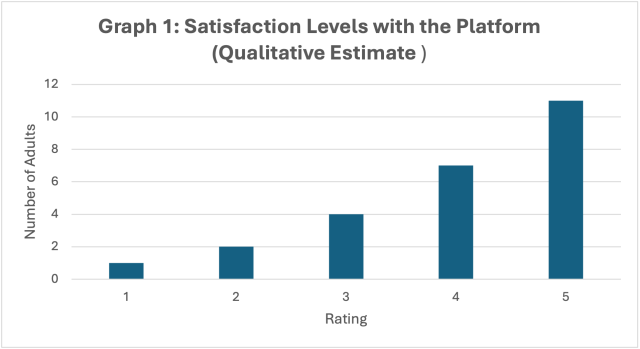
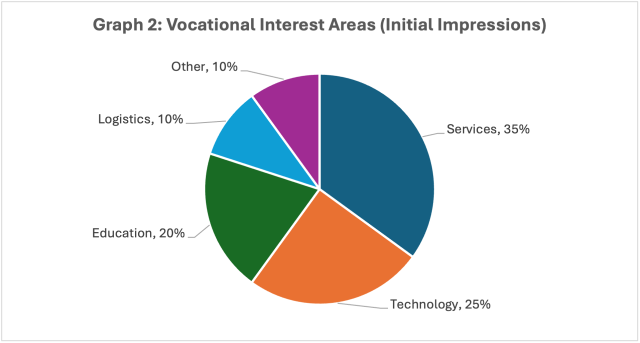
Most adult participants rated the platform 4–5, expressing emotional connection and a sense of achievement.
This graph reflects the vocational aspirations of adult participants as identified in the questionnaires.
Proposal for Future Research
Suggested Title
The Impact of the VITA Platform on Vocational Self-Efficacy Among Adults with Disabilities
Research Objectives:
Examine whether practicing with the platform enhances self-efficacy.
Assess the platform’s influence on readiness for employment.
Explore the role of parents in the process.
Research Methodology:
Pre- and post-practice questionnaires
In-depth interviews with graduates and parents
Qualitative analysis of participant feedback
Expected Outcomes:
A working model for integrating technology into vocational preparation
Recommendations for expanding platform use in additional frameworks
Summary
The use of the VITA platform in Shalva’s Adult Employment Department represents a breakthrough in vocational preparation for individuals with disabilities. During a time of uncertainty, the platform provided a safe, empowering, and professional space. We view it as a significant tool for continued personal and vocational development and recommend expanding its use and involving parents in the process.
Dr. Liron Benisti Director of Research and Development at Shalva
The Karten Centre at St John’s College is a hub of activity helping our learners develop vital employability skills. From here, we run our social enterprise Inkusionof learner’s artwork transformed into prints, postcards, mugs and so much more!
Student A has been a student at St. John’s for three years. During the current academic year, she joined our Karten Centre Printshop and has become well-versed in the basic workflows and processes of design.
Recently, Student A played a key role in printing and pressing uniforms for one of our partners, The Real Junk Food Project where she is undertaking a work placement. As a gesture of goodwill, Inklusion offered to replenish their old uniforms, something that Student A was highly involved with.
With funding for our new Oki transfer printer from the Ian Karten Trust, we have been enabled to print transfer images of The Real Junk Food Project’s logo. Student A assisted in preparing the transfer images, printing them on the Oki transfer printer, and then heat pressing adhesive patches to brand the logo onto the old uniforms.
The refreshed uniforms were presented to our partners last year. Since then, Student A has been using her newly prepared uniforms during her weekly placement at The Real Junk Food Project.
As part of our digital inclusion programme, a group of residents with complex epilepsy and other disabilities took the lead in co-creating content for The Meath’s social media platforms. Supported by staff and using adaptive equipment—including accessible cameras, tablets, and editing tools—participants planned, filmed, and edited short videos and interviews capturing day-to-day life at our residential care setting.
Working in small, interest-led groups, they identified the topics they wanted to cover. With guidance from our Head of Marketing and IT provider, they learned how to operate cameras, set up lighting, conduct interviews, and edit footage. Accessibility features—such as touch-friendly tablets, speech-to-text software, and visual editing tools—ensured everyone could take part, regardless of ability.
The result was a series of short interviews and posts giving an authentic insight into the personalities and stories behind The Meath. Participants gained confidence, communication skills, and a deep sense of pride in representing their community. The project not only enriched our social media but also built digital and creative capacity among participants—showing what’s possible when people with lived experience are involved in the process.
When the creative media and IT students left for the summer holidays last year the Queen Alexandra Charity IT department took over the classrooms in the Karten Centre to fit new equipment thanks to the support of the Karten Network. On their return in September both staff and students were delighted to find 2 x Newline Lyra Pro 65” Screens, 4 x 450 G10 Laptops, 24 x OptiPlex 7010 desktops and 24 x Iyama 24” monitors.
The new screens have replaced items that were purchased in 2004 and are bringing huge benefits. The main comments when talking to students is the fact that they are more accessible and so much clearer which, given a number of our students have visual impairments is ideal. It also enables students to concentrate on the board more easily. Another student comment was how much faster it was to start at the beginning of the lesson and noted how much more reliable they were.
For staff, in addition to echoing the students’ comments, they are enjoying being able to use the board for demonstrations which can clearly be seen by all in the classroom. They are also able to write the lesson and discussions on the board, have it converted to text and then are able to save the lessons as either text or pdf files which is a great aide for students after the lesson. The staff have also been impressed with the number of apps that are now available for them to access.
With regard to the computers and monitors both staff and students note they are benefitting from clearer monitors and the programmes they work on are now running faster than before. One student also commented on how much better it was to have smaller processing units giving them more desk space too.
Coby (Student) “The Screens are so much more reliable and much better than the old one”.
Ahmed (Student) “It is great to have improved technology, our computers are so much faster and take up less desk space too.”
The Queen Alexandra College (part of the Queen Alexandra Charity) currently has 26 students studying IT and 31 studying Creative Media on the following courses:
Level 1 Award/Certificate/Diploma for IT Users (QCF)
Level 2 Certificate/Extended Certificate/Diploma in IT (QCF)
Level 3 Certificate/Subsidiary Diploma/Diploma/Extended Diploma in IT
OCR Level 3 Cambridge Technical Diploma in Digital Media
BTEC Level 1 Introductory Certificate in Digital Media
If you’d like to learn more about the work of the Queen Alexandra Charity (including the College) please visit qac.ac.uk
Linkage College presents a number of case studies showing how the technology they purchased with a recent grant from the Ian Karten Charitable Trust has enabled teams to break down barriers to learning and create a more inclusive educational environment. The impact of this equipment goes far beyond academic achievement — it has supported the development of vital life skills, boosted learner confidence, and fostered a sense of belonging among our students.
Case Story 1: Student A – Supporting Spelling and Independent Learning
Student A is a student who faces challenges with reading, but her comprehension skills are strong. By incorporating a laptop into her learning environment, she has gained greater independence in her studies. With the use of speech-to-text software and spell-check tools, Student A can now confidently express her ideas in writing without the barrier of spelling difficulties. This has appeared to boost her self-esteem and allowed her to focus on her strengths, particularly in areas such as comprehension and analysis. The laptop has also provided her with access to a wider variety of learning resources, enabling her to progress at her own pace, without the frustration of struggling with manual writing tasks. This autonomy has positively impacted her overall motivation and engagement in the curriculum.
Case Story 2: Student B – Enhancing Comfort and Focus
Student B, a student who appears to thrive in close proximity to her lecturer, has found significant benefit from the use of a laptop in this setting. Student B is more comfortable sitting alongside her lecturer, and with the laptop in close reach, she can work more efficiently by referencing materials and engaging with interactive content during sessions. The laptop appears to provide her with a sense of security and focus, allowing her to take notes digitally, engage with resources, and manage her work in a way that best suits her learning style. This dynamic has appeared to have greatly improved Student B’s confidence in class and allowed her to be more active in the learning process.
Case Story 3: Student C – Independent Learning in a Personalised Space
Student C is a student who benefits from working in an environment that suits his individual learning style. By using his laptop in a space away from the main classroom, he has been able to engage deeply with his passion for mechanics while simultaneously meeting his English learning targets. The laptop has enabled Student C to undertake a bespoke project on mechanics that has been tailored to his interests and the criteria for his English curriculum. This project has not only reinforced his learning in English, including the application of technical vocabulary and written communication, but it has also allowed him to work independently in a space that minimizes distractions. The combination of personalisation and the flexibility to use digital tools has played a key role in Student C’s academic success.
In conclusion, the use of individual laptops has been a transformative tool in supporting our students’ unique learning needs. It has fostered independence, provided access to a wide range of resources, and enhanced engagement. By tailoring the use of technology to meet the specific needs of students like Student A, Student B, and Student C, we can continue to create inclusive and effective learning environments.
Case Study 4 – Communication apps
Student D is a dedicated and engaged learner who uses Grid on his laptop as his primary means of communication due to being non-verbal, he has demonstrated increasing confidence in navigating the software, selecting words and phrases to express his thoughts, answer questions, and participate in class discussions.
For example, during a literacy activity, Student D can use his Laptop with Grid to construct sentences related to the story being discussed. He can independently select key vocabulary words and structure his responses with minimal prompting. His ability to communicate through Grid has allowed him to engage more fully with his peers and Lectures, ensuring his thoughts and ideas are heard.
The use of Grid on his Laptop has had a profound impact on Student D’s education and overall well-being. Academically, he is more engaged in lessons, demonstrating improved comprehension and critical thinking skills. He can complete work with greater independence and confidently share his knowledge and understanding.
Socially, Grid has empowered him to interact with peers, fostering friendships and a sense of belonging within the college. The ability to communicate his needs, preferences, and emotions has significantly reduced frustration and increased his self-esteem. Lectures and support staff have also noted a positive shift in his confidence and enthusiasm for learning.
Overall, the integration of the laptop and Grid into daily routine has enhanced his academic progress and quality of life, providing him with a voice and the ability to actively participate in his education and social interactions.
Case Study 5
By being able to work independently on her laptop, Student E can avoid the overwhelming stress of social situations, especially during episodes when she may feel unable to interact with her peers. The laptop enables her to continue her studies in a comfortable environment, reducing the risk of further triggering anxiety or distress.
Having the flexibility to work at her own pace allows Student E to manage her stress levels and maintain a sense of control over her education, which can be incredibly beneficial in managing her mental health condition.
By receiving assignments and course materials via email, Student E can keep up with her coursework without having to attend class physically. This ensures that she is not missing out on essential learning despite her mental health episodes.
The ability to search and access a wide range of resources online gives her the flexibility to answer questions and complete her work, providing a valuable tool for independent learning. She can gather information at her own pace, which helps her overcome any barriers created by her condition.
Student E’s joint pain in her fingers and wrists can make traditional writing difficult or painful. The laptop allows her to type her work instead of writing manually, which helps to reduce physical strain. This adaptation ensures that her physical health doesn’t hinder her ability to participate in learning.
By using her laptop to access materials, complete assignments, and communicate with her lecturers, Student E can still contribute meaningfully to class discussions. While she may not always be physically present, she can share her thoughts and insights, staying engaged and involved with the learning process.
The flexible participation approach also allows Student E to contribute to discussions without feeling pressured to interact in a traditional classroom setting, reducing the potential for distress during social or group activities.
The laptop helps Student E maintain continuity in her education, even during episodes where she may not be able to attend class. She doesn’t fall behind on assignments or miss critical learning moments, which is vital for her academic progress and overall well-being.
By being able to complete her work remotely, Student E avoids feeling isolated from her peers, as she can still interact with the course materials, receive feedback, and stay on track with her studies.
The laptop provides Student E with the independence to manage her learning at her own pace and on her own terms, without needing constant supervision or assistance. This fosters a sense of autonomy and confidence in her ability to manage both her mental and physical health needs while continuing her education.
Student E’s use of a laptop has been instrumental in helping her navigate the challenges posed by her dissociative disorder and physical joint pain. It provides her with the flexibility to manage her mental health, reduces physical strain, and allows her to maintain access to her education without the added stress of needing to participate in a traditional classroom environment. The laptop empowers her to stay engaged, continue learning, and contribute to her academic progress, all while managing her personal health needs.
Case study 6
The support of the student having access to a laptop has had a significant positive impact on her learning experience, helping to address multiple barriers.
By allowing the student to work independently in a quieter, more controlled environment (the common room), she no longer faces the challenges associated with large group settings that may have been overwhelming or distracting. Smaller, quieter spaces have lead to a more focused learning experience, especially for students who struggle with anxiety or sensory overload.
The common room provides a quieter space where the student can concentrate without the disruptive noises often found in larger classrooms. This is especially helpful when the student struggles with environmental factors that affect focus.
By working independently, the student can progress at her own pace, allowing her to spend more time on areas she finds difficult and move quickly through sections she grasps more easily. This personalized pace ensures that she is not pressured to keep up with the speed of a class that may not align with her needs.
The shift to self-directed studies allows the student to take control of her learning, which can be empowering. She can now organize her study schedule, access materials at her own pace, and approach the work in a way that suits her learning style. This level of autonomy is especially beneficial for students with mental health challenges, as it provides flexibility and a sense of control over their academic journey.
The evidence of engagement and progression is now more easily accessible. By completing assignments on time and communicating regularly with the lecturer via email, there is clear evidence that the student is making academic progress, despite the previous barriers. This documentation is helpful for both the student and the lecturer, as it demonstrates that the student is actively participating in her learning.
The provision of the laptop through the Karten Network ensures that financial barriers are also removed, allowing the student to access the technology she needs without added stress. This support is vital for levelling the playing field and ensuring equal access to resources.
The arrangement of the student working with her 1-1 support in the common room ensures she has the support she needs while benefiting from a less distracting environment. The 1-1 support gives her a dedicated space to ask questions, clarify concepts, and receive help with assignments, which can lead to a deeper understanding of the material.
The 1-1 setting allows the student to feel supported without the social pressures of a classroom. This personalized support can help reduce feelings of isolation, and the student is more likely to engage because they have the attention and guidance they need.
The combination of providing a laptop, offering flexibility in where and how she works, allowing direct communication with the lecturer, and ensuring 1-1 support has significantly helped in removing barriers to learning for the student. The shift to self-directed studies is empowering her to take ownership of her learning, which has led to improved engagement and progress. The setup allows for better tracking of her academic journey, with clear evidence of her commitment to her studies and ongoing development. This tailored approach ensures that the student’s unique needs are being met while supporting her mental and physical well-being.
At Homefield College, we take immense pride in nurturing talent and providing real-world experiences that shape our students’ futures. One shining example of this is Luke, a Pathway 2 student who has been excelling in his internal work experience with our IT support team.
Luke’s dedication and skills have been nothing short of remarkable. Here’s a glimpse into his impressive contributions:
Upgrading Technology: Luke has been instrumental in downloading and installing Windows 11 on laptops, ensuring our systems are up-to-date with the latest software.
Preparing Devices for Sale: He has efficiently wiped laptops clean, preparing them for resale and contributing to our sustainability efforts.
Maintaining Smooth Operations: Luke has played a key role in making sure all site computers are running smoothly, providing essential support to our daily operations.
In addition to these tasks, Luke showcased his initiative by independently helping a staff member transfer important photos of student progress from their mobile device to a secure SharePoint area. This not only highlights his technical skills but also his willingness to go above and beyond to assist others.
Luke’s achievements don’t stop there. He has mastered the IT Zendesk ticket and asset management systems, demonstrating his capability in handling complex tools and processes. Moreover, Luke has taken charge of the HP £200 laptop cashback project. His responsibilities include ensuring that five older laptops are fully operational and ready to be shipped to HP with the necessary documentation. This initiative alone is set to save the college an impressive £1000 off the purchase price of five new laptops.
We extend our heartfelt congratulations to Luke for his exceptional performance and look forward to seeing his continued success in the field of IT. Keep up the fantastic work, Luke!
Bry is non-verbal, with very limited movement and she tends to withdraw from people if her mood is low. In order to support Bry we have provided one-to-one sessions in the sensory room, which have helped her because the sensory experiences are distracting and helps her to re-engage with her surroundings and has allowed more social interaction with her carers.
The use of the new sensory equipment has enabled Bry to communicate her choices more clearly through eye pointing. She indicates clearly what holds her interest through her gaze and facial expression if she is not interested, Bry will look away or not respond. Her preferences tend to be visual, which has made the projected interactive images provided by the Omi Reflex projector particularly beneficial, as Bry can look at them directly and track their movements across the screen.
Because of Bry’s very limited movement, the use of the mobile magic carpet has been adapted for her by projecting images on a tabletop which is extended by using a white sheet over her lap so she can look down on the pictures and touch the image movements to cause an effect. When Bry is completely engaged, her arms and hands relax, enabling her to press a switch to operate an interactive toy or bubble machine. She demonstrates a clear understanding of cause and effect by repeating the action without prompting if she enjoys the result, giving a tiny smile at the end.
The refreshed sensory provision has had a very positive impact for Bry it has helped her reestablish some old skills and enhanced her levels of engagement and well-being. What the staff have noticed is that the more Bry engages with the sensory provision in the home, the more Bry is able to transfer the communication skills learnt to other areas and activities using her eye movements.
Case Study Laura – Ravenswood Support Worker
Laura, one of the support workers at Pamela Barnet, has been working closely with the new sensory equipment. Through direct practical application, she has increased her understanding of the methods of communication best suited to the individuals she supports. This understanding has transferred into her daily tasks, making life easier in the home.
For many years, Ravenswood has benefited from the Karten Network funded sensory room in the precinct. Norwood is keen that knowledge is more widely applied by staff to enable the people we support. The renewed interest in the sensory area has provided Laura with development opportunities to create new sensory activities. This new responsibility has enhanced her role as she can use new equipment to add to the care provided, increasing engagement, regulation and communication in imaginative ways to benefit the people she supports.
Laura has reported that she’s noticed a renewed uptake in staff members taking individuals to the sensory room since the new equipment has arrived. The people we support have been using the facilities more regularly which has increased their alertness and engagement.
Laura explained that having more flexibility with the range of equipment allowed staff to respond more spontaneously to the needs of the people in their care, providing calming activities should someone be distressed. It also enabled staff to offer alternative sensory activities during bad weather or when other activities are cancelled. Also, being able to move the mobile projectors along with smaller items means the equipment is more fully used.
Laura has been planning with Wendy, future sensory themes and is keen to link other activities in and outside the home. For example, using a jungle theme with sensory stories link them with jungle art projects to decorate the home, taste sessions if appropriate, and an off-site visit to the Living Rainforest Experience.
Laura said, “I am keen to get a more structured timetable for the sensory room in place so all the residents can benefit more regularly from the enhanced facility. I have seen the benefits of the sensory provision for different individuals, and their sensory preferences should form part of their person-centred activity planning.”
Impact
The purchase of the additional mobile sensory equipment has enabled more variety and flexibility, as certain activities can be taken to individual flats or bedrooms as needed. For example, Jay* had become quite distressed and the Mobile Magic Carpet and fibre optics were taken to his room. This created a calming sensory activity which helped him to refocus, improving his mood and regulation. An additional positive outcome was the increased confidence of the staff to respond in a proactive way. The flexibility, simplicity and ease of use of items such as the Magic-Carpet and Omi-Reflex projector have encouraged more use of the equipment, therefore benefiting the people we support.
Staff have been able to refresh their approaches to working with the people we support in the sensory room. Closer observation of the responses from the people we support has increased staff understanding of individuals sensory preferences, communication methods and social interaction.
Staff have been enabled to develop more detailed ‘sensory profiles and how to work with me’ documents so new or agency staff have a reference point when engaging with an individual in the sensory room. This continues as a developmental piece of work.
With the investment in new equipment, a further outcome has been that the Pamela Barnet home has appointed a member of staff to focus on and co-ordinate the sensory activities provided. This has helped to embed and drive the thematic sensory approach so that good practice is developed with the staff, while ensuring full use of the equipment.
The impact of the new mobile sensory equipment has resulted in an increase in equipment being used.
Development includes further thematic approaches not only in the sensory space but linked with other activities around the home. The aim is to create immersive experiences in the form of events, including a themed sensory story space in decorated areas around the home created by in house art activities, themed food and music.
Encouraging staff to take imaginative, creative ideas that incorporate sensory diets will- further benefit the people we support.
Next Steps for sensory provision at Ravenwood
To embed the use of the sensory provision within individual’s person-centred plan. Completing sensory profiles.
Continue to widen staff awareness and skills within the sensory provision through ongoing training.
Plan new sensory activities for the coming year and keep the momentum going!
Norwood’s use of Assistive Technology (AT) is at a critical point. Transitioning from older analogue to digital technology. Aiming to consolidate and embed its extensive organisational knowledge and expertise gained over the past decade. By prioritising user engagement, empowering individuals, and fostering a culture of knowledge sharing, Norwood can create a future where digital technology serves as a powerful tool for enhancing the lives of the individuals we support.
We are tremendously grateful to The Karten Network for your continued support. We appreciate your ongoing partnership as we work to enhance the lives of those in our in our community.
Laura enjoyed spending her time in Lakeside Printing by finding pictures on google and printing them out. Motivating Laura to use the equipment for any other purpose was almost impossible. Whilst it was lovely to Laura enjoying her time, she was not developing her skills or progressing in her use of technology during her time in Printing.
Peer support along with visual aids helped to engage Laura in making a range of products
With the new focus on the skill of sublimation, Laura has become increasingly more engaged with the production element of Lakeside Printing. With the help of visual resources, Laura has been working side by side her peers who have supported her to make some fantastic personalised products, including door hangers, coasters and air fresheners.
Pride of her design when being printed
The pride Laura has in her work as it is being printed is evident for anyone to see! These new opportunities have allowed Laura to progress her love of printing pictures into a productive skill where she can design the picture and use them with purpose.
Using new equipment
Laura’s new found confidence inLakeside Printing has seen her using equipment that she would not previously have engaged with. Not only is Laura using the equipment – she isdoing so with a smile!
Gathering together products needed
Laura can use the visual step by step guides to see which resources she will need to create her end product and it allows her to find everything easily.
Referring back to step by step
The easy to follow step by step guides in Lakeside Printing have allowed Laura to use the equipment, such as the laptops and the Sublimation Printer, independently. Laura can design and make a range of products without staff support and refer back to it whenever she is unsure on the next step. If Laura did get stuck, her peers can use the visual guides to help her. Not only are Laura’s IT based skills developing, but so are her independence and peer to peer support skills.
Operating the Heat Press
Using the Heat Press is something that previously would have worried Laura, however, her new interest in Lakeside Printing has helped her to over come these worries and use all of our available equipment and develop new skills.
Presentation for the customer
Once Laura has completed all of the steps its time to do a quality inspection and get it ready for the customer. When Laura is happy that the product is exactly as she wants it, she carefully presents it in a box to add the final touch.
Contacting the customer
Laura’s pride in the final result means she cannot wait to show off her work to the customer! Laura calls up the customers to let them know that she has made their product and it is ready to collect.
Happy customers!
Thank you Ian Karten Charitable Trust
We can’t Thank you enough for the opportunities you provide our Trainees with. As a not-for-profit organisation we would struggle to purchase this equipment and maintain it all. The sense of pride and achievement our Trainees have during their sessions in Lakeside Printing are priceless. THANK YOU!
Funding recieved from the Ian Karten Charitable Trust made it possible to purchase new assitive technology. This equipment has allowed our clients to enjoy their hobbies again. This would include reading, doing puzzles, crafting and building Lego. Clients can also be more independent by reading their own mail and cooking instructions. They can also communicate with family through reading letters, writing birthday cards and looking at family photos.
These two case studies demonstate what a wonderful impact the new equipment is having.
Case Study 1:
Mrs S relied on very strong glasses for reading, she needed a new pair but were unable to get a pair that had strong enough magnification for her. She was always against using hand held magnifiers as she felt this brought attention to her sight loss.
She dropped into the centre one day and was shown the reveal 16 and explore 5 and 8 magnifiers. Straight away she felt they would be really useful for her, and wondered why she had never gone down this route before.
Having bought a reveal 16 and an explore 5, she can now read letters independently, she can see the whole letter rather than just a little at a time. The explore 5 helps her to see prices and size labels, which she couldn’t manage to do by herself before this.
Mrs S said: “I am managing so much more by myself now and it is less stressful for me. I wish I had done this before now.”
Case Study 2:
Mrs M came into Hub to look at magnifiers which she could use to read but also to help watch the TV. She has age-related macular degeneration (AMD) and is struggling with near and distance vision. We demonstrated a range of products however Mrs M loved the Explore 12. We were able to apply to the Skiffington Trust for her to purchase one.
Mrs M said: “The magnifier has been very useful for me. I am very happy with it. I was able to use it to sort through a load of paperwork and I use it when I am watching quiz programmes on the TV.”
About a year ago I fell down my son’s stairs and damaged my spinal cord, becoming a tetraplegic. Before that I worked for M&S as a Store Manager, so I was always busy and on my phone a lot. When I was first in King’s I told my daughter to keep my phone because I couldn’t work it. I was there for eight weeks and was then transferred to Queen Elizabeth Hospital and was still unable to work my phone. I spent six months with no phone. If I wanted to watch my iPad, I had to call someone if I wanted to change the channel or start watching a film. It was the worst feeling, not being able to contact anyone; my friends had to contact my daughter as they couldn’t contact me directly. My daughter also had to do my online banking. Anything I needed I had to ask for help with.
When I came to Stoke Mandeville that was my first goal, to be able to use technology. I met Alison, Aspire’s Assistive Technologist, who is so good, she really knows her stuff. She introduced me to so much technology for accessibility, such as different types of mouth control; she went through everything. I started using voice control and it was such a game changer. Suddenly I could ask my daughter to leave my phone with me as I could work it and I could use my iPad without having to ask someone. It’s the simple things that can mean a really big change. I got a laptop from work, and she helped with that too. I’m able to use my fingers more to operate that now. It’s been so amazing; everything I can do now I couldn’t do for six months.
I am desperate to go back to work and I feel confident that I could do that – at least with the technology side – even if some of the physical side of it I wouldn’t be able to do. Technology-wise, I feel 100% confident that I could do the job. My boss has been very supportive and visits me regularly. When he asked me what my concerns are, I said firstly when and where I was going to live and, secondly, going back to work. He said he didn’t know of a Store Manager in a wheelchair “but that’s not to say you can’t be the first”. My job is waiting for me and I should be able to go back to work in some capacity, they are really good at looking after people.
I’m leaving hospital at the end of April and going into a bungalow where I will be for 6-12 months whilst my home is being adapted. I lost my husband nine years ago and have three children. One of my daughters lives at home and the other has four children. My son got married last year, which I had to miss.
I’m a very positive person and tried not to let my injury get to me. If you let it get to you, you’ll go on a downward spiral. Because I was so positive, that stopped my three children from getting depressed about it as well. As it goes on you can’t help having more and more negative thoughts about what you can’t do, but at Stoke Mandeville they educate you into things you can and can’t do.
The first six months were definitely harder because I couldn’t use technology, as I spent a lot of time in bed. Alison was brilliant, so patient. It’s a shame I didn’t meet Alison earlier in my journey.
Seashell is an extraordinary place for extraordinary young people. We support children and young adults with the most complex needs in the country to reach their potential through our specialist school, college and residential care facility.
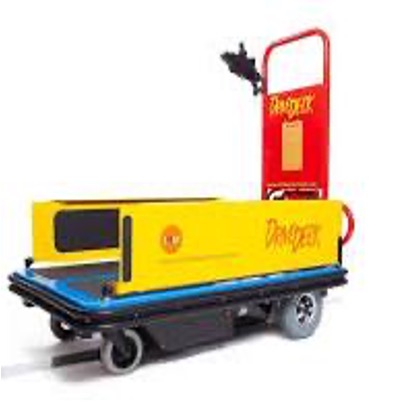
Seashell were kindly provided with two Drive Decks (left) by the Ian Karten Charitable Trust. This allowed us to have one based in our specialist school and one in the college. These have been hugely beneficial to Seashell and are being used in several ways to benefit our learners across our site.
Smile Smart Tech describe their innovative Drive-Deck device as a “Unique training and assessment device which allows wheelchair users to remain in the comfort of their personal seating to train in using switches and control use”.
The drive deck allows an individual to learn and practise the skills needed to drive their wheelchair, using any kind of switch. The deck has several options to be accessible to a multitude of learners:
A drive Deck can be set to follow a track and activated with a single switch; an accessibility feature that allows learners with complex needs, at the start of their wheelchair driving skill progression, the opportunity to learn safely. With the introduction of more switches, alongside experience and training using the equipment, an individual can learn to drive their wheelchair off a track – in Free Drive mode.
My name is Ted and I have been the Assistive Technologist for Seashell Royal College Manchester since Jan 2022. When I started in post the Drive Decks had already been funded and provided to us by the Karten Trust. Since then, I have utilised and evolved the college’s use of them.
I now run Drive Deck sessions multiple times a week. I have collaborated with our Occupational Therapy (OT) department to embed sessions, skill learning, and progressions into the college students’ use of the Drive Deck. Together with OT we have embedded the use of the drive deck into our switch skills progression matrix.
Currently we are using the Drive Deck in three distinct ways in students’ Drive Deck sessions:
Used for further switch progression and development: The Drive Deck provides an innate way of introducing and embedding more switches to control more aspects of driving, if this is the switch progression our students are on.
Adapted, fine motor rehabilitation: I have recently had wonderful success using the Drive Deck with a student who recently suffered a stroke and lost a vast amount of his left hand and arm usage.
This learner, who uses a standard wheelchair, previously had the capability of self-propelling himself functionally using both his hands. This student’s OT and I have devised a weekly session where he is being supported to re-learn to use his left hand and arm. At the start of these sessions the student was very resistant to any encouragement and prompting to engage with his left arm.
However, driving the Drive Deck quickly became very motivating for him; especially with the introduction of a preferred and motivating P.O.L.E (*person, object, location, event) at the end of the track, in the form of switch activated music on a large interactive whiteboard. This allowed the learner to activate a switch with his left hand, with staff modelling and prompting the repeated action of this; and once he has driven to the end of the track, he activates his favourite music, again using his left hand and a second switch.
This learner’s OT has fed back that; “The use of the drive deck has been integral in the rehabilitation of a young adult who had upper limb surgery to reduce contractures. Switch activated motion on the drive deck has proven to be an intrinsically motivating activity for this young adult with a clear cause and effect structure allowing it to be accessible for them. This has facilitated our ability to utilise both neuroplasticity and his own volition to increase the functional use on a non-dominant hand post-surgery. This would not have been possible without OT and AT collaboration and highlights the importance of a continued relationship between the two professions.” – Dionne Nmai, Seashell Trust Occupational Therapist
OT and I have been blown away by the rapid rehabilitation benefits of using the Drive Deck in this way, and this has opened our eyes to further ways of using this equipment with Seashell learners.
Switch use progression in driving/ self-propelling: working towards an assessment for a switch adapted powered wheelchair. Working in conjunction with Smile Smart, the Drive Deck can be used for assessment as well as training and experience on switch-wheelchair driving. This can lead to an assessment, given by, Smile Smart to evaluate an individual’s skill set and overall use of the Drive Deck equipment and determine whether they are ready and would further benefit from a Smile Smart Powered Wheelchair.
Smile Smart System (SSS) Powerchairs are adapted personal powered wheelchairs tailor-made to an individual specification. SSS powerchairs are modified using a wide range of controls and switching to offer optimum comfort, freedom and independence for the user.
These unique powerchairs come with anti-collision sensors, voice confirmations, pre-determined track following, speed and motion controls.
Here at Seashell, I am very proud to say, I am about to undertake my first student assessment for a Smile Smart System Powerchair. This young man has been working with the college Drive Deck for the past 18 months. He has progressed from using one switch, driving on a track, to using a bespoke layout of three switches to drive forwards and turn left and right in Free-drive mode, being able to choose where he wants to Drive to. In this way the Drive Deck is offering this individual an opportunity that he would not be able to experience without this equipment.
Working as an Assistive Technologist I have not come across a similar or alternative method of offering support, training, experience and assessment for switch-users learning wheelchair driving who cannot self-propel or use a typical powered wheelchair joystick. Our OTs report that:
“The drive deck is used both as an assessment and intervention method, with progress tracked using GAS goals as an outcome measure. Initial assessments inform the clinician’s understanding of gross and fine motor movements, including range of movement and limb function, what style of switch would be appropriate for use, and what POLEs the student may find motivating in addition to the drive deck itself.
Following assessment, OT and AT design interventions dependent on intended outcomes for the student. In the case of one student, the drive deck session is being used to increase participation in switch-based activities, promoting increased upskilling through repetition with familiar switches and POLEs.
For another student, initial use of the drive deck for switch work indicated the potential for the development of skills in independent driving and has led to AT arranging an external assessment for the student to be considered as a potential powered wheelchair user. A third student engages more consistently in drive deck sessions than in other switch work, and uses the drive deck functionally to practice upper limb control, which can be particularly tiring for them physically. In all cases, the drive deck has been utilised with full-time wheelchair users whose physical or medical conditions present a barrier to independent movement, and in all cases consistent motivation has been observed when the student is able to move themselves with greater autonomy, whether for
learning cause and effect, practicing switch-operation skills, or developing driving skills.” Lucy Basing, Seashell Trust, Occupational Therapist.
Going forward I would like to offer other services within the Network, and any around the Northwest; who may be considering the purchase of a Drive Deck the opportunity to get in touch with myself, and try the equipment with us on site here at Seashell. I would be happy to coordinate visits where you could see the kit yourself, and observe the sessions we run with our students.
The Ian Karten Charitable Trust, in providing the funds for the Drive Decks we have at Seashell, has immensely improved the service we are able to offer the Young Adults we support; and the benefits of the Drive Decks are vast, unique, and still evolving.
Thank you to Smile Smart Technology, and to the Ian Karten Charitable Trust for making this possible.
Sean, was introduced to our organisation in 2017 when, as a service user with support needs asked Cantraybridge to assist with funding and support.
Sean showed great interest and ability in information technology and was very keen to learn 3D modelling and printing, Photoshop and video editing to name but a few.
As Sean, is neurodivergent and requires time and patience to help him process information, he requires a breakdown of information, quiet time, and a relaxing environment where there are no pressures. He has proven very adept in seeing and producing detail and his work is never complete, until he has eradicated any flaws/faults/ glitches. This can be time consuming, but he will not give up until he has found a solution.
In observing Seans’ skills, he was assisted and supported using assistive technology and his one-to-one sessions to build on his knowledge and understanding of the Digital World. If he wanted to know how something worked, he would research online.
Through lockdown, he was assisted by his one-to-one support through Zoom meetings and shared applications to produce over 100 face visors for the NHS using his own 3D printer.
After the pandemic Sean was supported in an extended work trial with a leading game developer whose games sell over the world. This was set up by Cantraybridge. He tested games and made the company aware of any glitches, flaws, bugs in the product and helped iron them out. He was very professional in his outlook to this work and after showing off his abilities, Cantraybridge then took this to the next stage and offered Sean a few hours of paid work to assist in the Digital studio, which is funded by the Karten Network.
Sean is now working regularly in the Digital Studio assisting the trainer to teach the service users 3D modelling applications and how to use the 3D printer to create the models that the service users have designed.
He is also in the middle of trying to fix a second-hand 3D printer that was donated to the College and again, will not stop until it is working.
In November 2020, while standing on Broadway Market I was caught in the crossfire between rival gangs and shot through the neck which shattered my spine and left me with a C4 Spinal Cord Injury. This has meant I am paralysed from the chest down with little arm movement and no hand dexterity. I spent 1½ months at the Royal London and was then moved to the London Spinal Injury Centre in Stanmore where I started my rehabilitation and met the team at Aspire.
Due to my limited arm movement and lack of hand function I was really struggling to use my phone, let alone a computer, which was particularly difficult as it was during Covid when friends and family were not allowed to visit and so I was so reliant on the nurses and healthcare assistants to do simple tasks like press a button.
I was then introduced to Andrew, Aspire’s Assistive Technology Manager, who helped me try out different computer mice and various types of equipment so I could decide which I was most comfortable with. I now use a Head Mouse, a Micro Light Switch and Dragon speech recognition software as well as Apple’s voice dictation iPhone technology.
All of these tools helped me connect with my family whilst I was in hospital and started me on the road to greater independence.
I was discharged at the end of April 2021 and was able to borrow a Head Mouse for a while before I could get one of my own, which I did thanks to a grant from the Frenkel Topping Foundation.
This has completely changed the way I live and given me independence and autonomy over my life. Not only do I use this technology daily to complete simple tasks, like sending emails, shopping and social media but I have gone back to work part-time as an e-commerce website analyst in the fashion retail industry. None of this would have been possible without Andrew’s help!
A huge part of my rehabilitation and life is art. This started at Stanmore, using hand splints where I found my line again and these tools enabled me to make marks and experiment. I have now expanded on using hand splints, in combination with my iMouse and graphics tablet to create new works of art. This practice has not only helped to improve the limited movement in my arms, building strength and articulation, but more importantly, it’s become a form of personal expression that has helped me to reconnect to my identity.
I am now delighted to have had my first debut exhibition, which ran from 28th September to 3rd October 2023, at the Nunnery Gallery in East London. My work embodies themes of control, restriction, growth, and personal narrative as I explore my relationship to identity and disability through paint, fabric, sculpture, film, and light, using technology to assist me in creating work.
There is a serious lack of representation of disabled people in the arts, from poor accessibility through to institutional ableism. I am strident in my commitment to raise public awareness about paralysis, to platform my own experiences of living with a disability, to share grief, loss, resilience and hope and give insight into struggles of independence in today’s inaccessible world.
Follow Natalie’s journey on Instagram @sneaky_biggers.
Dan has been a learner at St John’s College for 4 years. He is one of our Printshop users and as part of his learning plan, has recently been tasked with keeping the Inklusion website (as pictured below) up to date. To enable him to carry this out, the Printshop team have been supporting him to learn the data input skills and steps of the process involved. With the ever-growing demand from employers for computer skills, data input is a vital skill that is in universally high demand in the workplace.
The funding to build the site was kindly provided by The Ian Karten Charitable Trust two years ago. We always aspire to equip our learners with the knowledge and skills they need to compete for jobs when they leave St. John’s, and our Karten Centre is a vital element of our careers support programme
Dan began with taking and uploading images to our Inklusion website. With support, he took photographs of new products in our range, which includes mugs, t-shirts, bags, and fine art prints. He then used Adobe Photoshop to reduce the size of each image from 300 dpi to 72dpi (dots per inch), which is an important step to promote faster loading speed on the website. Dan then removed the image’s background and made it transparent which resulted in a ‘web-ready’ .png file, which will have a crisp, clean appearance on the website. He then uploaded the web-ready image to the Media Library of our website’s admin section (picture shows Dan working), and from there, it can be picked up on the new product page.
The next step was for Dan to input the essential data for items in our online shop which included: description of the product; name of the artist that made it; price; number held in stock; and product category. Once all the details are logged and published on the site, his final task is to double check to confirm all the details are correct and visible to customers. Dan also makes full use of the equipment and is very keen on all aspects of design and production.
Below are images of some of the items he has made and posted onto the site:
Dan has become very proficient in this and enjoys the responsibility of this important task which is playing a key role in his learning and development at St John’s College.
The grant received from the Ian Karten Charitable Trust has enabled Cantraybridge to set up their first Digital Studio complete with Computers, 3D scanners/printers and VR headsets.
21 Young people with additional support needs have benefited from our course on Digital Animation. They have completed the beginners course which was so successful that they have progressed to the intermediary course. All students using the digital equipment are gaining in confidence and are working on individual projects which range from animation to 3D modelling.
Some students have bought their own computers so that they can do more learning at home in their own time and showcase what they have done to their peers on the course.
Our students in the wood skills department have also benefited by having a 3D scanner/printer in their department. This printer has been fitted with a woodburning lazer engraver which has opened up the possibilities within the department and students have been making small items that are being displayed and sold in our café area.
Not only can we include more digital literacy in the department, but we can increase our product range and enhance things made by including greater detail. The following images of coasters are an example of increasing product range. Also included is a bird table showing how we can personalize and enhance the detail on products. This can lead to enhanced design and creative possibilities for our students.
We are also running a Camera Club in the Digital Studio where we are editing photographs using the computers. Some of the photographs taken by students are being superimposed onto wood and will be sold in our café. An example below.
We have also been in touch with Chris Creed from Birmingham university and are assisting him in the research of Intelligent Coding assistants. This should lead to more learning for our students and enablers alike.
Case study – Gareth
One of our students, Gareth (Gaz) has really enjoyed the courses run in our Digital Studio and the experience gave him the confidence to apply for a trial run by a computer gaming company called Outplay. This involved Gaz working on new games that Outplay wanted to market and finding glitches or errors within the game. Gaz has been so successful in this that it is likely he will be offered an employed position with the company.
Case study Mhairi Jane
Mhairi Jane had an accident the day before and wanted some quiet time to work. The printer was a suitable distraction from our typical work and she was thrilled with the item she made and left feeling calm and saying how happy she was.
People at Kisharon found the Karten Suite especially helpful during the Covid pandemic, including being able to register their own Covid tests on the NHS website independently. Now the equipment is put to good use supporting our social enterprises and teaching IT life skills.
During the lockdowns those with learning disabilities, including many shielding at home, accessed Zoom exercise classes and various other sessions recorded on the Karten iPads and computers.
Since then, many of the 14 individuals using the Karten Suite every day – averaging a total of 8 hours’ use a week – find it underpins Kisharon’s packaging and fulfilment work.
Computers and iPads are used to email the manager of our gift shop about arrival dates, order stock from suppliers including Tesco and Amazon and access Excel spreadsheets to store customer information and keep track of orders. The iPads proved handy when taking photos for the garden project at the library. These photos will be displayed at an upcoming charity art exhibition event.
IT skills learned at the Karten Suite have also improved users’ independence and self esteem.
Kisharon people have set up email addresses and learnt how to log in to their emails, written up personal targets, learnt to use YouTube, created work CVs and profiles and even booked social plans online and used Google Maps to find the best route!
Bag My Treats Enterprise
One of the other things which runs directly from the Karten Suite is the Bag My Treats Enterprise. This is run end to end by the people we support.
They check orders which have come into the designated email account, process the orders by uploading the information onto a spread sheet, fulfilling the order contacting customers to arrange collection delivering the order to our gift shop for collection, sending a template invoice to the customer and then checking with Finance whether it has been paid.
Much of this work is carried out in the Karten suite. Previously this was the responsibility of a staff member and when they moved on the people we support wanted the chance to run the enterprise themselves and this is what they have achieved. Every element of the enterprise becomes a teaching point. IT skills are improved, people are able to use email create spreadsheets prepare invoices check and double check information. All key elements of the foundation tier of learning are covered, so their time encompasses maths, English and IT
As you can see, the Karten suite is put to excellent use and is enjoyed by many of the people we support.
As always, many thanks for your support.
Case study: Miriam’s story
Miriam graduated from Langdon College this summer and started volunteering at Childs Hill Library in Cricklewood which Kisharon runs. We devised a personalised programme of learning, including improving her IT skills and work experience. This included work at Kisharon’s Tuffkid Nursery, and reading with children at a mainstream Jewish school.
Now based at the library, she writes birthday and greeting cards to Kisharon volunteers and manages a reading project at a local school. We are very proud of what she achieved. She is testament to the wide range of tasks that people with different abilities are capable of. We hope that this combination of skills development and work experience will lead to a paid administrative role.
Miriam said: “I find all the different jobs I do very good because they help me learn new things. At the beginning of the year, I never knew how to laminate but after having worked at the school, I feel very confident at this. Similarly, I could never cut precisely, but now I am very good at it. I have learnt to get the library ready for opening, carried out health and safety checks, and I feel confident answering customer queries. I love to help people in all the jobs I do.”
In August 2021, ESPA College South Hill was granted funding and official Karten Centre status and saw the successful installation of a brand new Sensory Room.
ESPA College South Hill is an education setting for young autistic people between the ages of 16 and 25 years. The majority of students have additional and complex needs, including learning disabilities, ADHD, mental health conditions, behaviours that challenge and sensory issues.
The sensory space was created in collaboration with Mike Ayres Design and college staff. The team chose a suitable space in their building, and selected the very best equipment, to meet the complex sensory needs of their students.
The Sensory Room features:
Large bubble tube
Rainbow light bar
Tactile cause and effect wall panel
Sound and light wall panel
Interactive fibre optic unit
Sensory projector
Sparkle cloud
Integrated audio and visual system
The sensory needs of our students can be a barrier to their education, so the installation of this state-of-the-art Sensory Room supports students to manage their sensory needs; making it easier to focus and participate in lessons and community activities.
The room is used, at present, for two 2-hour sessions per day (Mon-Fri). This is a mixture of individual and small-group use (usually a maximum of three students at one time).
Because the users of the room have full control over the mood created, the room can be quiet and calm, or stimulating, depending on what the individual requires. When someone is craving some sensory input, the Sensory Room can be the perfect place for them to get the stimulation that they need. The room is also used regularly to implement established sensory routines in order to reduce or manage sensory overload, and regulate sensory input.
Sessions within the room can be for small groups – which encourages socialising amongst the learners – or individuals, who like to use the space help to manage emotions and reduce anxiety and stress. It can also be a safe place to practice coping skills and emotional regulation strategies.
Our learners and staff at South Hill have had access to the new Sensory Room since the beginning of the academic year and the feedback has been overwhelmingly positive. We have been providing inductions for ESPA residential staff, so they can use the room for their service users when the college is closed (evenings and weekends). We have also opened in holiday times for our residential services. This is something we would like to increase once people become confident using the equipment.
Case Studies
Katie and Sarah use the Sensory Room twice a week. They both use the room for different reasons and get different outcomes from the sessions that take place.
Katie
Katie likes to go into the room and enjoy the quietness as this really helps her to self-regulate. She likes to listen to Disney music whilst in the space and interact with different pieces of equipment; most often she likes to entwine the string lights through her fingers and watch the different colour changes that occur. The texture of the strings on her hands as she moves them through her fingers stimulates her senses through touch and sight. The sensory input that Katie requires is high, and she needs her senses stimulating throughout the day, in different ways, using sensory items and objects.
Katie enjoys watching herself in the mirrors and seeing her own reflection, and the facial expressions she makes, whilst watching the bubble tube. She will focus on the bubbles moving up and down the tube, and watch as it changes colour after a few seconds. Occasionally, Katie will watch what staff are engaging with and, with some encouragement, will explore the equipment herself. Katie will watch staff interacting on the sound box drums on the wall and she will move closer and then start off one at a time by pressing one of the buttons and then copying the sounds the staff make. Eventually she will carry on doing it all herself.
Sarah
Sarah loves all the different colour and mirrors in the Sensory Room. She loves to explore the different textures using her hands and feet. Sarah loves to remove her socks and feel the different textures of the flooring and mats with her feet. Sarah will move around the Sensory Room and explore the different texture of the equipment; again with her hands or her feet.
Sarah loves to sit on the mats near the by bubble tube and watch herself in the mirrors and explore and watch what others are doing around her. She will pull faces in the mirrors and occasionally she will touch the mirrors if she sees something she likes. Sarah will also interact with the bubble tube; watching the bubbles move up and down the tube and exploring the colour changes. Sarah can get very fixated with the bubble tube and she will lie on the mats next to it and explore everything about it; the colours; the different shapes of the bubbles; the way a few bubbles stick together. She finds all of this so interesting and curious and she expresses this through her facial expressions.
Throughout Katie and Sarah’s sessions in the Sensory Room both students are encouraged to use different pieces of equipment and try and engage their senses through touch, sight, smell and sound. We have found that if for any reason we miss a session in the Sensory Room both Katie and Sarah’s behaviour can change. This is apparent through their body language towards staff, and refusing to listen to staff, or becoming very mischievous and running to different parts of the college.
The Sensory Room plays a very big part in Katie and Sarah’s education as they need their senses stimulated, otherwise they would find their day hard to cope with. By using the Sensory Room, Katie and Sarah can learn in different ways and absorb information differently. The sessions are very much tailored to each student’s needs.
Additionally, by using the different equipment with both Katie and Sarah, this helps both students to improve their colour recognition and fine and gross motor skills. It also helps with hand/eye coordination.
Georgia
Georgia really enjoys it in the Sensory Room. She relaxes a lot by the bubbles tube and watches the colours change. She also enjoys watching the colours on the Sparkle Cloud. She is also known to fall asleep sometimes! The room really helps Georgia relax.
Our immediate focus has been responding to direct need from our members and initiating a mix of face-to-face (when it was safe to do so) and remote training sessions as planned.
Our Centre has adopted a cautious reopening approach over the past 12 months to keep members safe, recently returning to being open four days a week. The equipment we were able to purchase from Karten has enabled us to deliver hybrid remote and in person training during this time and for those who may still lack the confidence to attend in person.
We’ve also been able to respond to requests for Braille training, with a number of sessions delivered. One example included a face-to-face session for five learners in November, who had previously taken part in Braille Alphabet sessions over Zoom. The members were able to get hands-on experience of this new technology including the Braille frames.
Writing is accomplished by placing a piece of paper in the slate, aligning it correctly and closing the slate. The person writing begins punching the dots in the upper right corner of the frame and works backwards towards the left. In addition, each combination of dots, which members had previously learnt, had to be completed backwards (flipped), so that when the paper is removed and turned over, the braille reads correctly. This was quite a task to master; however, the group really enjoyed the challenge and a couple of members loaned the slates to continue practicing at home.
We also looked at the much-awaited Hable One device which is essentially a braille keyboard that can be hooked up to tablets and phones using Bluetooth. The keyboard is used in conjunction with a screen reader and can be used for both navigation and text input. What makes these devices so amazing is the fact that they can be used by people who would normally struggle to perform the complex gestures needed to navigate phones and tablets using a screen reader and is much easier to master than having to learn to touch type.
The new chairs and tables were also used with positive feedback about comfort in the IT Suite. The Braille embosser has been put to good use especially with remote training, with resources printed and sent to members in advance of Zoom sessions. Fingerprint Braille course volumes have also been loaned as planned to members. We have also been able to produce learner documents in Braille and have been able to respond to transcription requests from members of the public.
Laptops and desktop computers with Zoomtext Fusion software and MS Office have been used to deliver both face-to-face and remote sessions. We also have a learner booked in to receive training on the Dragon Dictation software.
We are also planning on launching accessible gaming sessions in the future using the funded digital gift cards from Karten.
Case studies
Anon
After losing his eyesight in 2019 due to an accident at work, Anon’s journey was impacted by the pandemic meaning he hasn’t been able to adapt to his condition as quickly as he may have done.
Since becoming a member at Beacon, Anon has been enjoying I.T. and assistive technology training, making progress in learning to touch type. He has also started to explore how he can use the Mac iOS screen reader.
Anon is aiming to return to employment working in technology and with computers, meaning the course and Karten equipment is providing him with invaluable skills and confidence to regain his independence. Anon will also be supported through our employment programme.
Anon learning with equipment provided through Karten.
Nathan
Nathan began to lose his sight in July 2021 due to Leber hereditary optic neuropathy. Formerly a scaffolder and very independent, Nathan has struggled on occasion to come to terms with his condition which has gradually worsened as time has gone by.
Since being referred to Beacon, we are helping Nathan to adjust and learn new skills, allowing him to boost his confidence and regain his independence.
Since joining, Nathan has had cane training allowing him to get around unaided empowering him to meet his friends and family, run errands and attend appointments. He has also attended a Fab Lab training course.
Having developed his confidence a little more, Nathan recently began using Karten equipment through IT training. He has become more proficient in touch type and can now easily navigate the keyboard. This has enabled him to explore using new technologies such as the Windows screen reader.
Nathan would like to pursue a new career and attend college, where we are positive that he will be using assistive technology with confidence following his training.
We use cookies on our website to give you the most relevant experience by remembering your preferences and repeat visits. By clicking “Accept All”, you consent to the use of ALL the cookies. However, you may visit "Cookie Settings" to provide a controlled consent.
This website uses cookies to improve your experience while you navigate through the website. Out of these, the cookies that are categorized as necessary are stored on your browser as they are essential for the working of basic functionalities of the website. We also use third-party cookies that help us analyze and understand how you use this website. These cookies will be stored in your browser only with your consent. You also have the option to opt-out of these cookies. But opting out of some of these cookies may affect your browsing experience.
Necessary cookies are absolutely essential for the website to function properly. These cookies ensure basic functionalities and security features of the website, anonymously.
Cookie
Duration
Description
cookielawinfo-checkbox-analytics
11 months
This cookie is set by GDPR Cookie Consent plugin. The cookie is used to store the user consent for the cookies in the category "Analytics".
cookielawinfo-checkbox-functional
11 months
The cookie is set by GDPR cookie consent to record the user consent for the cookies in the category "Functional".
cookielawinfo-checkbox-necessary
11 months
This cookie is set by GDPR Cookie Consent plugin. The cookies is used to store the user consent for the cookies in the category "Necessary".
cookielawinfo-checkbox-others
11 months
This cookie is set by GDPR Cookie Consent plugin. The cookie is used to store the user consent for the cookies in the category "Other.
cookielawinfo-checkbox-performance
11 months
This cookie is set by GDPR Cookie Consent plugin. The cookie is used to store the user consent for the cookies in the category "Performance".
viewed_cookie_policy
11 months
The cookie is set by the GDPR Cookie Consent plugin and is used to store whether or not user has consented to the use of cookies. It does not store any personal data.
Functional cookies help to perform certain functionalities like sharing the content of the website on social media platforms, collect feedbacks, and other third-party features.
Performance cookies are used to understand and analyze the key performance indexes of the website which helps in delivering a better user experience for the visitors.
Analytical cookies are used to understand how visitors interact with the website. These cookies help provide information on metrics the number of visitors, bounce rate, traffic source, etc.
Advertisement cookies are used to provide visitors with relevant ads and marketing campaigns. These cookies track visitors across websites and collect information to provide customized ads.