
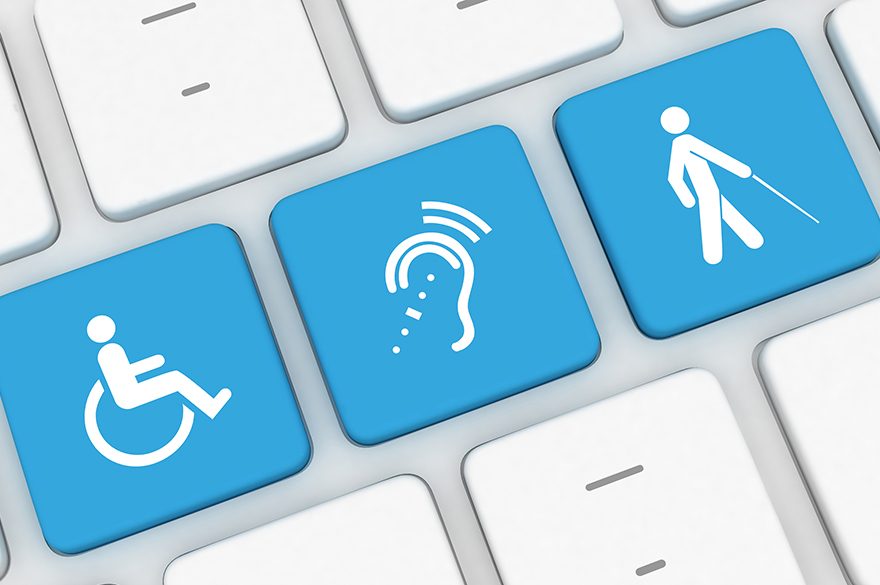
Technology for people with disabilities can be truly liberating and empowering. It enhances, enriches and potentially transforms lives. From my personal perspective as a person with a disability I am heavily reliant on technology to function in my everyday life. However, one key aspect to the use of technology by people with disabilities is that it is accessible.
By accessible, in this context, I mean digitally accessible. Digital accessibility is a practice to ensure that websites, mobile apps and other digital resources e.g. eBooks can be accessed and used by people with impairments, either directly or through the use of assistive technology.
Legislation within the USA, EU and UK require developers to ensure that website and apps are accessibly. However, in reality, compliance with this is mixed – this is why we find that some apps don’t support switch access.
In the UK the Equality Act (2010) (and the Disability Discrimination Act 1995 in Northern Ireland) requires organisations not to discriminate against people with disabilities and provide reasonable adjustments where needed. On the 23rd of September 2018 new regulations on the accessibility of websites and mobile applications of public sector bodies were introduced.
The “Public Sector Bodies (Websites and Mobile Applications) (No. 2) Accessibility Regulations (2018)” require public sector websites and mobile applications to comply with specific accessibility standards. These regulations are applicable to all publicly funded institutions. Three compliance deadlines have been stated:
- 23 September 2019 – Public sector websites published on or after 23 September 2018 must be compliant.
- 23 September 2020 – Websites published before 23 September 2018 must be compliant.
- 23 June 2021 – Apps must be compliant.
In simple terms, to comply with the Public Sector Bodies (Websites and Mobile Applications) Accessibility Regulations two main requirements must be met:
- Publish an accessibility statement – this must be based on a template statement that is available from: https://www.gov.uk/government/publications/sample-accessibility-statement
- Meet accessibility standards, either the international accessibility standard, WCAG 2.1 AA or the European equivalent, EN301 549
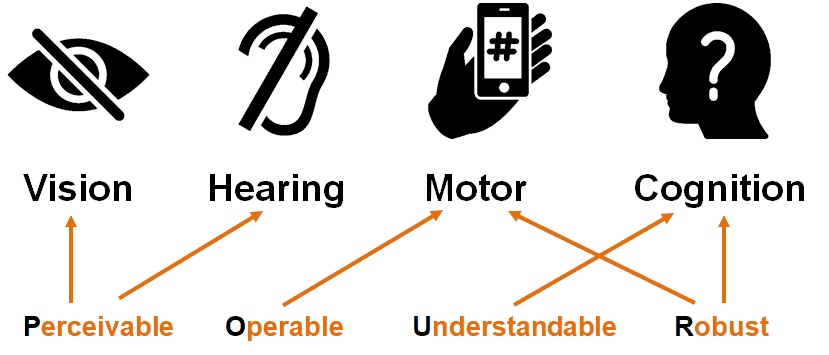
These guidelines are extensive, and while much effort has gone into improving the readability, the documentation still tends to be quite technical and can be tedious to read. I will therefore attempt to provide to some high-level guidelines. Current web accessibility (which is applicable to apps and other digital accessibility) is structured around four principles: Perceivable, Operable, Understandable, and Robust (POUR).
POUR
Note, I use “website” in this article, but it is applicable to apps too.
Perceivable:
Website users must be able to process information presented on/through the website. In broad terms, this means that a website and the content contained within it must be presented in a way that people of all abilities are able to process it. For example, text support for any audio content for people with a hearing impairment; audio for people with a visual impairment – this does not necessarily mean creating audio for all text but that screen readers and other assistive technologies can access the content of the website.
Simply put: Is there anything on the website that someone who has a visual impairment (including colour blind), or who is deaf would not be able to perceive?
Operable:
Website users must be able to operate the website with a variety of tools. Many people with a disability either have difficulty or cannot operate a mouse at all. It is therefore imperative that the website supports keyboard-based interaction.
To support users with cognitive impairments to operate a website, animations and media should be controllable. Any time limits for completing an action should be generous or configurable. All people, not just those with disabilities, make mistakes so users should be supported by providing appropriate instructions, cancellation options, and warnings.
Simply put: Can all functions of the website be performed with a keyboard? Can users control interactive elements of the website? Does the website make completing tasks easy?
Understandable:
If the website users can perceive and operate the website, can they understand it? Support users by using clear, concise language and offering functionality that is easy to comprehend. If a user takes an action, the connection between the action and the result should be obvious. Navigation should be consistent throughout the website. Forms should follow a logical flow, be clearly labelled and provide adequate guidance.
Simply put: Is all of the text on the website clearly written? Are all of the interactions easy to understand?
Robust:
Website users use their own preferred technologies. Within reasonable limits, a website should work well across platforms, browsers, and devices i.e. websites should not dictate the technology users can use. Ensuring that a website conforms to standards and conventions is one of the best ways to meet the principle of robustness. Clean well written code is generally more robust and accessible across platforms.
Simply put: Does the website only support specific browsers or operating systems, or devices? Is the website developed in accordance with standards and best practices?
Specific technical guidelines
Within these principles there are specific technical guidelines on how to create accessible websites. The General ones are:
Navigation and website structure
Make use of well-structured mark up. i.e. heading should be marked with the appropriate heading tags and in a logical order H1 > H2 > H3….etc. Ensure all parts of the website are able to be accessed without a mouse and that the reading and navigation order is logical and intuitive including multiple ways of finding information. Provide a means for users to skip repetitive elements on the page e.g. providing a “Skip to Main Content,” or “Skip Navigation” link at the top of the page which jumps to the main content of the page.
Colours
Ensure there is high contrast between the text presented and the background colour. Ensure that colour is not only used to convey information or as a prompt e.g. do not say “click the red button to continue”.
Images
Ensure all images have alternative (alt) text unless they are purely for decoration. Ideally decorative images should be called from the style sheet, not embedded in the page. For images that are purely decorative, such as a bullet point or border, the alt text should be empty or null. Alt texts should be appropriately descriptive – think of describing what the image is about.
Audio and video
Ensure you have subtitles, captions or at the very least written transcripts available with video and audio content. If there is audio that plays automatically on a website, ensure that these sounds can be paused or stopped by the users. Check your audio and video has open captions (captions that are available all the time) or written transcripts and that there is a pause or stop on automatic audio on your pages.
Text
Ensure the text can be made larger without affecting the content or function of the page or website. Don’t use images of text purely for decorative purposes.
Tables
The use of tables for layout should be avoided and only used for tabular data. Tables should be marked up with tags (table heading) to aid screen reader users to make sense of the content.
Links
Ensure that links describe where the link is going, what the link is or the purpose of the link. Links should make sense when read out of context.
Forms
Ensure there are labels immediately next to fields you want people to type in or click on. Check fields that prompt for an input (e.g. name, email, comments) have a label next to them which explains what data is to be entered.
Page time limits and flashing
Ensure pages with a time limit can have the time limit adjusted or turned off. Moving, blinking or scrolling can be used to highlight content so long as it lasts less than three seconds. However, do not put anything in your pages that flashes more than three times in any one second.
Resources and further reading:
The primary resource for web accessibility best practice guidelines is the W3C’s Web Accessibility Initiative (WAI) who set the standards. The standard that is most relevant to the new regulations is the Web Content Accessibility Guidelines (WCAG) 2.1. You may have seen that some websites state that they have an “A”, “AA”, or “AAA” rating this is based on their compliance to the WCAG.
- W3C Accessibility Standards: https://www.w3.org/WAI/standards-guidelines/
- Web Content Accessibility Guidelines (WCAG) 2.1. : https://www.w3.org/TR/WCAG21
- How to Meet WCAG 2 (Quick Reference): https://www.w3.org/WAI/WCAG21/quickref/
- W3C WAI Accessibility Principles: https://www.w3.org/WAI/fundamentals/accessibility-principles/
- W3C WAI Design and Develop tips and tutorials for writing, designing, and developing for accessibility: https://www.w3.org/WAI/design-develop
- The Public Sector Bodies (Websites and Mobile Applications) (No. 2) Accessibility Regulations 2018: http://www.legislation.gov.uk/uksi/2018/952/regulation/4/made
- Understanding new accessibility requirements for public sector bodies: https://www.gov.uk/guidance/accessibility-requirements-for-public-sector-websites-and-apps#meeting-accessibility-requirements
- BBC HTML Accessibility Standards: http://www.bbc.co.uk/guidelines/futuremedia/accessibility/html/
- WebAIM’s WCAG 2 Checklist: https://webaim.org/standards/wcag/checklist
- Jisc – Meeting accessibility regulations: https://www.jisc.ac.uk/accessibility
- Jisc – How to navigate the new digital accessibility regulations: https://www.jisc.ac.uk/blog/how-to-navigate-the-new-digital-accessibility-regulations-02-oct-2019
- Lexdis – Digital Accessibility: https://www.lexdis.org.uk/digital-accessibility/
- Webaim Resources: https://webaim.org/resources/
- UK Home Office accessibility dos and don’t Posters: https://github.com/UKHomeOffice/posters/tree/master/accessibility/dos-donts/posters_en-UK
Article meta data
Clicking on any of the links in this section will take you to other articles that have been tagged in the same category.
- Featured in the Karten Winter 2019 Newsletter
- This article is listed in the following subject areas: Technology, Update from Technology Advisor