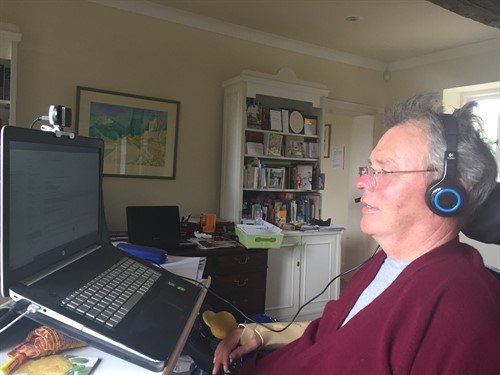
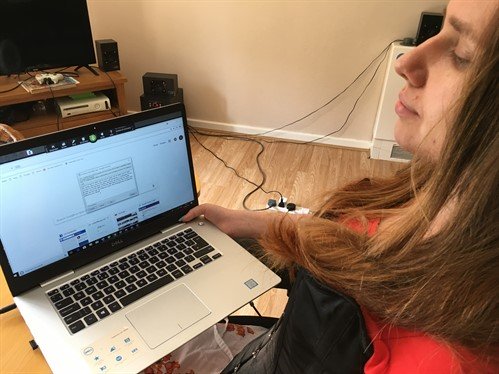
In 2015 I had a fall from a horse that left me paralysed from the shoulders down. Whilst I was a patient in Stoke Mandeville Spinal Injury Centre, Andrew, Aspire’s Assistive Technology Manager, provided me with essential tools that I still use very effectively now.
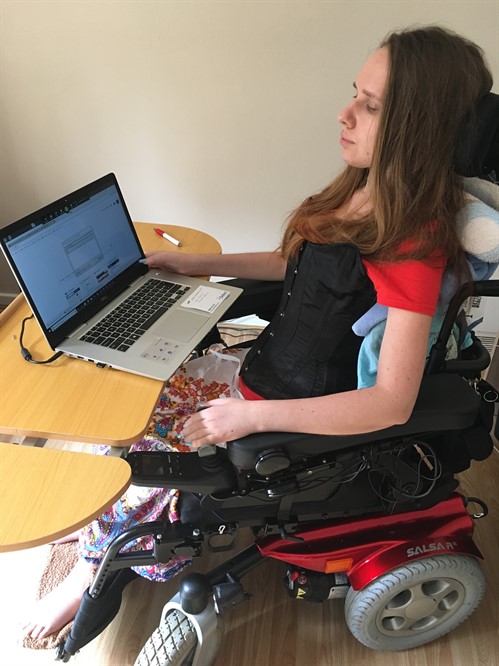
With Smart Nav I can move the cursor around the screen by moving my head; a dot on my glasses is tracked by an infrared camera. It gives me really good control over the cursor and it works well with Dragon voice recognition software. Andrew helped me to operate it initially; at times it felt like learning to type again, and I’m still learning new commands now. I have learnt it can be important to check how accurately Dragon has taken down your words. There was a period when I began to receive rather strange emails back from close friends. On re-reading emails that I had sent out, where I had dictated “XXX”, Dragon had written “expect sex”!
With these tools, I am able to read and write emails and do everything I need to on my computer. It’s meant I can continue my work as a Non-Executive Director Search Consultant. I run my own business, mostly working from home, but with a staff of seven.
Assistive Technology has been a life-saver; it’s meant I can get back to work at a time when I suspect otherwise things would have been very difficult. It also allows me to read books independently and do everything else we all use computers for. The only limitation I have is how long I can sit in front of a screen.
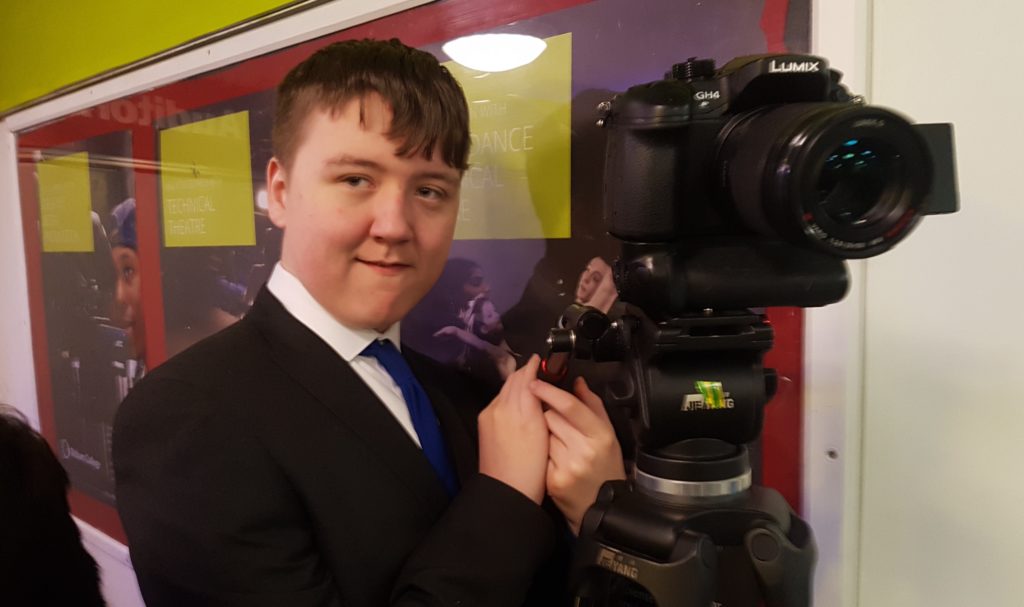
2020 marks the 100th Anniversary of Ian Karten’s birth and we are planning a celebratory year. New Bridge Productions have kindly agreed to lead on the production of a Centenary Film. The New Bridge team are based in the North West and will be going into local Karten Centres to do some filming. But we want to represent what is going on in Centres across the UK and in Israel so would like to invite you to produce your own footage. New Bridge Productions have produced some guidance to ensure your video footage is of a high standard. If you want any assistance with this exciting project don’t hesitate to get in touch with Dawn: dawn@karten-network.org.uk
Welcome to our Winter Newsletter! There’s lots of super stuff in this edition of our Karten Newsletter, we hope you enjoy reading it. I absolutely love this time of year, we’ve nearly made it through the working year and most of us are looking forward to some quality downtime with our nearest and dearest over the Christmas and New Year period. Whatever you are doing the Karten team wish you all the very best for Christmas and the New Year. We’re looking forward to working with you in 2020.
Technology for people with disabilities can be truly liberating and empowering. It enhances, enriches and potentially transforms lives. From my personal perspective as a person with a disability I am heavily reliant on technology to function in my everyday life. However, one key aspect to the use of technology by people with disabilities is that it is accessible.
By accessible, in this context, I mean digitally accessible. Digital accessibility is a practice to ensure that websites, mobile apps and other digital resources e.g. eBooks can be accessed and used by people with impairments, either directly or through the use of assistive technology.
Legislation within the USA, EU and UK require developers to ensure that website and apps are accessibly. However, in reality, compliance with this is mixed – this is why we find that some apps don’t support switch access.
In the UK the Equality Act (2010) (and the Disability Discrimination Act 1995 in Northern Ireland) requires organisations not to discriminate against people with disabilities and provide reasonable adjustments where needed. On the 23rd of September 2018 new regulations on the accessibility of websites and mobile applications of public sector bodies were introduced.
23 September 2019 – Public sector websites published on or after 23 September 2018 must be compliant.
23 September 2020 – Websites published before 23 September 2018 must be compliant.
23 June 2021 – Apps must be compliant.
In simple terms, to comply with the Public Sector Bodies (Websites and Mobile Applications) Accessibility Regulations two main requirements must be met:
Meet accessibility standards, either the international accessibility standard, WCAG 2.1 AA or the European equivalent, EN301 549
These guidelines are extensive, and while much effort has gone into improving the readability, the documentation still tends to be quite technical and can be tedious to read. I will therefore attempt to provide to some high-level guidelines. Current web accessibility (which is applicable to apps and other digital accessibility) is structured around four principles: Perceivable, Operable, Understandable, and Robust (POUR).
POUR
Note, I use “website” in this article, but it is applicable to apps too.
Perceivable:
Website users must be able to process information presented on/through the website. In broad terms, this means that a website and the content contained within it must be presented in a way that people of all abilities are able to process it. For example, text support for any audio content for people with a hearing impairment; audio for people with a visual impairment – this does not necessarily mean creating audio for all text but that screen readers and other assistive technologies can access the content of the website.
Simply put: Is there anything on the website that someone who has a visual impairment (including colour blind), or who is deaf would not be able to perceive?
Operable:
Website users must be able to operate the website with a variety of tools. Many people with a disability either have difficulty or cannot operate a mouse at all. It is therefore imperative that the website supports keyboard-based interaction.
To support users with cognitive impairments to operate a website, animations and media should be controllable. Any time limits for completing an action should be generous or configurable. All people, not just those with disabilities, make mistakes so users should be supported by providing appropriate instructions, cancellation options, and warnings.
Simply put: Can all functions of the website be performed with a keyboard? Can users control interactive elements of the website? Does the website make completing tasks easy?
Understandable:
If the website users can perceive and operate the website, can they understand it? Support users by using clear, concise language and offering functionality that is easy to comprehend. If a user takes an action, the connection between the action and the result should be obvious. Navigation should be consistent throughout the website. Forms should follow a logical flow, be clearly labelled and provide adequate guidance.
Simply put: Is all of the text on the website clearly written? Are all of the interactions easy to understand?
Robust:
Website users use their own preferred technologies. Within reasonable limits, a website should work well across platforms, browsers, and devices i.e. websites should not dictate the technology users can use. Ensuring that a website conforms to standards and conventions is one of the best ways to meet the principle of robustness. Clean well written code is generally more robust and accessible across platforms.
Simply put: Does the website only support specific browsers or operating systems, or devices? Is the website developed in accordance with standards and best practices?
Specific technical guidelines
Within these principles there are specific technical guidelines on how to create accessible websites. The General ones are:
Navigation and website structure
Make use of well-structured mark up. i.e. heading should be marked with the appropriate heading tags and in a logical order H1 > H2 > H3….etc. Ensure all parts of the website are able to be accessed without a mouse and that the reading and navigation order is logical and intuitive including multiple ways of finding information. Provide a means for users to skip repetitive elements on the page e.g. providing a “Skip to Main Content,” or “Skip Navigation” link at the top of the page which jumps to the main content of the page.
Colours
Ensure there is high contrast between the text presented and the background colour. Ensure that colour is not only used to convey information or as a prompt e.g. do not say “click the red button to continue”.
Images
Ensure all images have alternative (alt) text unless they are purely for decoration. Ideally decorative images should be called from the style sheet, not embedded in the page. For images that are purely decorative, such as a bullet point or border, the alt text should be empty or null. Alt texts should be appropriately descriptive – think of describing what the image is about.
Audio and video
Ensure you have subtitles, captions or at the very least written transcripts available with video and audio content. If there is audio that plays automatically on a website, ensure that these sounds can be paused or stopped by the users. Check your audio and video has open captions (captions that are available all the time) or written transcripts and that there is a pause or stop on automatic audio on your pages.
Text
Ensure the text can be made larger without affecting the content or function of the page or website. Don’t use images of text purely for decorative purposes.
Tables
The use of tables for layout should be avoided and only used for tabular data. Tables should be marked up with tags (table heading) to aid screen reader users to make sense of the content.
Links
Ensure that links describe where the link is going, what the link is or the purpose of the link. Links should make sense when read out of context.
Forms
Ensure there are labels immediately next to fields you want people to type in or click on. Check fields that prompt for an input (e.g. name, email, comments) have a label next to them which explains what data is to be entered.
Page time limits and flashing
Ensure pages with a time limit can have the time limit adjusted or turned off. Moving, blinking or scrolling can be used to highlight content so long as it lasts less than three seconds. However, do not put anything in your pages that flashes more than three times in any one second.
Resources and further reading:
The primary resource for web accessibility best practice guidelines is the W3C’s Web Accessibility Initiative (WAI) who set the standards. The standard that is most relevant to the new regulations is the Web Content Accessibility Guidelines (WCAG) 2.1. You may have seen that some websites state that they have an “A”, “AA”, or “AAA” rating this is based on their compliance to the WCAG.
We were fortunate to have lots of lovely seasonal animations and stills for our 2019 Karten Network greeting. As ever it was very difficult to decide on a winner as there is so much talent across our Karten Centres.
All entrants received a Certificate to thank them for their super work and creativity. However, there could only be one winner, and I am delighted to congratulate Dick Eborn who attends The Grange Karten Centre in Bookham. His animation and choice of music are charming and capture the spirit of the festive season perfectly.
At the end of this year, Angela Reeve is retiring from her roles of Ian Karten Charitable Trust Trustee and Administrator. Angela has worked for the Trust for 18 years, having previously been employed by Ian Karten himself. During this time, Angela has been super-efficient, organised and reliable. Angela has ensured the smooth running of systems and will have worked with many of you when working on agreement documents or releasing funds to your organisations. It has been an absolute pleasure to work with Angela and to know that the administrative aspect of the Network has been in such competent hands. I know you will want to join with me in thanking Angela for all she has done and wishing her well for a very happy and long retirement.
We are introducing an application form which will be required for funding applications. I have added a link to the form that should be used by existing Karten Centres, along with the SpreadSheet template that forms part of your application. The application deadline for the next Trustees’ meeting is 12 noon on 17 January 2020. The completed application form and associated documents should be emailed to dawn@karten-network.org.uk. Please advise me at the earliest opportunity if you are thinking of developing an application for the next meeting.
Over the Christmas and New Year period our
FitzRoy Assistive technologist, Carrie, will be visiting our three Karten
Centres to deliver the first FitzRoy Assistive Technology Workshops.
Carrie will be working with key staff and
managers within the services to explore how the equipment is currently being
used to enhance the lives of those we support and to identify innovative
applications to enhance the impact of the current technology.
Staff attending the workshops will become ‘AT
Champions’ and support the day to day use of the equipment, promoting best
practice and building confidence amongst the rest of their team.
The Maltings in Norfolk, were the first
service to hold the workshop and the session was attended by the IT champions
from the day service, other key staff as well as the managers.
Key ideas were to develop basic guides to
using the accessibility features on the iPads and PCs that would be easily
accessible to staff as well as introducing an ‘Assistive Technology Passport’
which summarises the needs of each individual in relation to the devices they
will be using. New resources are also going to be trialled including the online
HelpKidzLearn resources which will be accessible on the PCs, iPads and
Clevertouch as well as apps such as Pictello which will help with activity
sequencing.
The people we support at the Maltings have
been busy preparing to take part in their local Christmas light switch on. This
year FitzRoy have their own stall and the people we support have been using the
PCs and iPads at the service to research ideas for things to design, make and
sell on the stall as well as to print labels for their ‘reindeer food’!
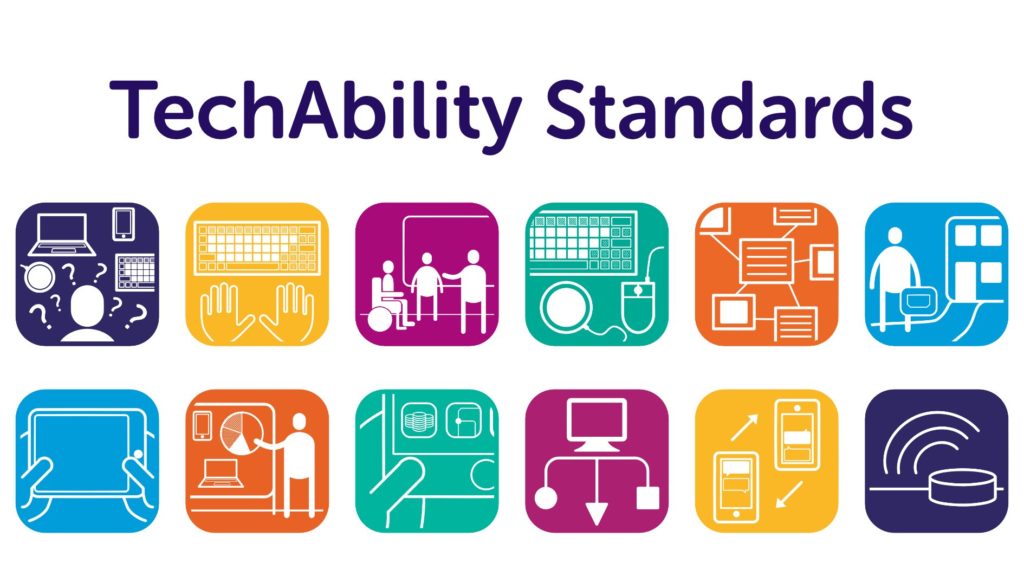
TechAbility has been working with Natspec Colleges and Karten Centres to improve the standards of Technology. This has been achieved through delivery of webinars, consultation visits, seminars and events.
One of the key findings during this time is the lack of guidance around what colleges/centres should be striving towards. There is an understanding that technology should be used, but without a clear view of how it should be used and to what ends.
For this reason we created the TechAbility Standards.
How to use them:
Starting point to improve technology use Audit tool or inspiration in an understandable format
Understanding how TechAbility can improve educational outcomes To encourage targeted and needs-led interventions
Quality Assurance/Inspection Measuring excellence with technology focused on learner outcomes.
The TechAbility 2019 conference was held in Birmingham on 21st November. Delegates found the event to be enjoyable, engaging and though-provoking. If you weren’t able to go along you can now access the conference materials.
The link below will take you to a page where you can download individual presentations from keynote speakers and workshops.
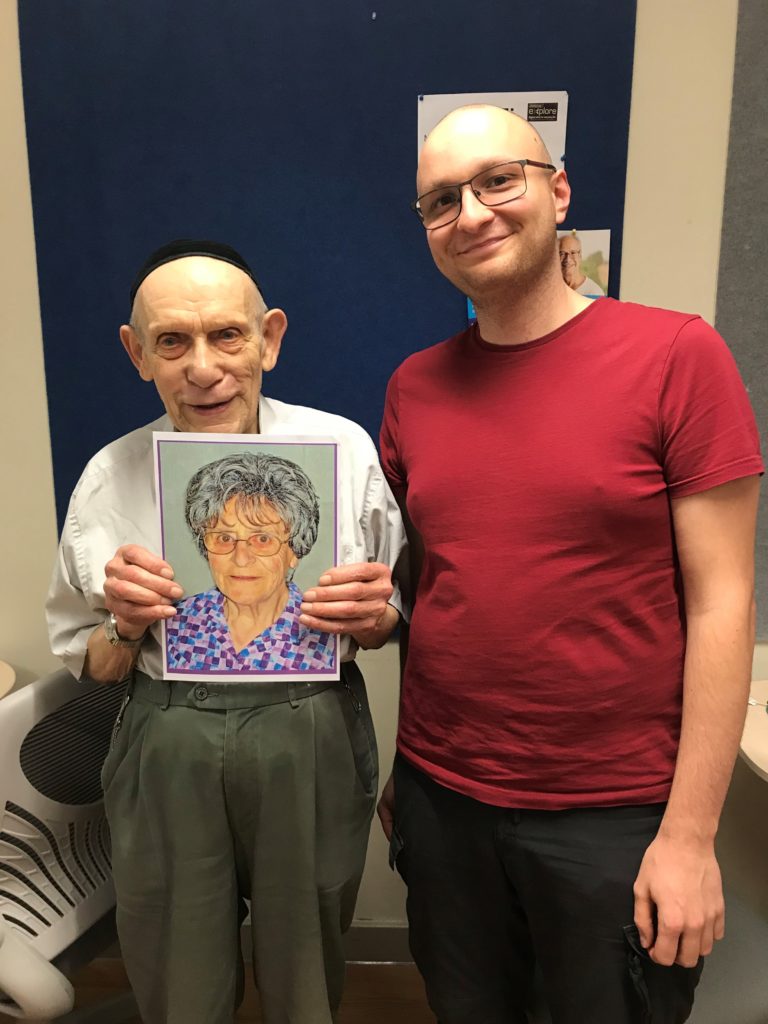
We’re proud to report that the age record has been broken in
Jewish Care Explore, a Karten Centre, in the month of October.
We provide our mainstream technology training and support
service to older members of the community as well as any adults with mild to
moderate disabilities. As such, the age range was quite wide already, going
from 22 to 94, with a median age of around 68.
This was pushed even further this October, when Justin
signed up for a new membership. Justin is a passionate photographer who has
captured on (digital) film many of the most cherished moments of the community.
He also owns PhotoShop, which he uses to retouch or improve his photos.
He signed up because he wanted to print some of the photos
he had taken – his old dot-matrix printer had become unreliable. He also
discovered that he could do some basic editing on our computers, using the built-in
Windows 10 app.
Being a very active, gregarious and energetic man, we were
very surprised to find out that he was, in fact, 96 years old, having been born
in 1923.
We were even more surprised when, less than a week later, David
joined our service, and broke the record again, having been born about a month
earlier than Justin!
David is well-equipped with technology, owning an iPhone,
iPad and laptop (and that’s just what he’s shown us). We provide beginner and
intermediate courses for learning how to use these devices, but these weren’t
necessary for our latest member.
What he was looking for was support in using technology
independently. Many Explore members are familiar with technology but like to
have support in case they have a question or a problem pops up.
In his case, this meant sorting out issues as the they came up,
such as the Safari browser accidentally going into split view or changing some
settings on the iPhone.
He also wrote some DVDs as a means of distributing a lecture
he has co-authored. We, of course, mentioned creating a channel as an
alternative to easily sharing videos. He seemed very interested – perhaps soon
YouTube will be breaking a new record as well?
Having a conversation with family, friends and colleagues is something
most of us take for granted, but one that can be denied to people with motor
neurone disease (MND) – a neurological disease which attacks the nerves that
control movement, leaving people unable to move, talk and eventually breathe. As the disease progresses, over 80% of people with MND will have
communication difficulties as their vocal muscles cease to work.
With thanks to the Ian Karten Charitable Trust, we were able to expand our communication aids service for people with MND. Part of this service is to support people with MND who wish to voice or message bank, and the Karten-funded equipment is helping us to do this.
Specialist
communication aids make a huge difference to daily life for people living with
MND by providing people with a voice through the conversion of text to speech
using an in-built synthesised voice, however many people wish to create a
personalised synthetic version of their own voice (more commonly referred to as
voice banking).
Voice banking has existed for over ten years, but over the last six years technology and services have improved to such an extent that more and more people are able to realise the benefits.
“I’ve now got a digital model of my voice which sounds really like me, it is quite impressive. So if my voice goes completely then I will be able to use my model voice on a little gadget. Luckily things have moved on since Stephen Hawking first got his synthetic voice.”
Michael who is living with MND.
Although technology is
improving, the process of voice banking remains ostensibly the same as it
always has. The user records a set of phrases, using a laptop or computer and a
headset microphone, that are then used to form the basis of the synthetic
version of the voice. The number of phrases needed depends on the service used
but can be anywhere between 215 and 3,500.
With the technology
improving, the time taken to make the recordings has reduced from an average of
90 days in 2018, to 6 days in 2019 which has made a big difference to people
with MND undertaking the process.
The quality of the voice
produced is also rising. Until recently the services would use the recordings
to capture enough phonemes to create the voice, whereas now the process
captures the algorithms within the recordings, allowing for clearer and faster
voice creation.
Message banking is another
option. Message banking allows you to
add emotion to your recordings, but as it is simply recording messages it means
you are limited to what you record. However, it can be useful for recording particular
catchphrases, place names, or a distinctive laugh.
One example of how message
banking can benefit is a lady who had voice banked, but her dog did not
recognise the synthetic voice due to the lack of emotion – however when using
her message banked phrase, her dog instantly recognised the opportunity to go
for a walk!
Through our communication aids service, we loan laptops and headset microphones to enable people with MND to voice and message bank. We also provide financial support towards the cost of creating a voice. To help promote message and voice banking to people with MND, we have created a short video, which you can view below.
What is voice and message banking?
“The equipment provision via the Karten Trust has been very important as it has ensured very quick access to the correct items needed, minimising delays, which really matter when someone’s voice is already changing.”
Louise Rickenbach, Regional Care Development Adviser, MND Association.
Langdon College’s Karten Centre has been working on a
multigenerational collaborative painting and photography project, bringing
together two of Manchester’s key charities.
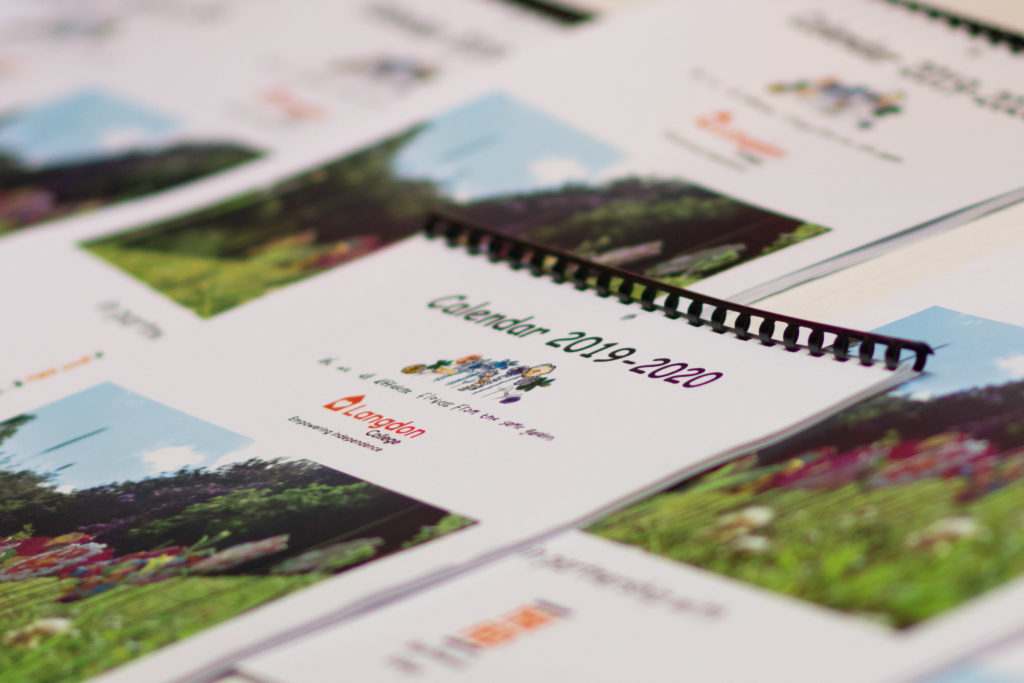
This partnership working has resulted in the production of a Jewish calendar
which was launched on 22nd September 2019.
Students at Langdon College, who work within the LC-Print
enterprise business, residents of the Feds’s Heathlands Village care home had
taken part in joint art sessions over recent months. Together they created original artwork and
imagery based on a monthly theme, many of which reflect Jewish festivals and celebrations.
Langdon College tutor, Rebecca Holmes said, “The students
have worked incredibly hard behind the scenes.
Through their teamwork and efforts, they also enhanced many of their
interpersonal skills, such as communication and organisational ability.”
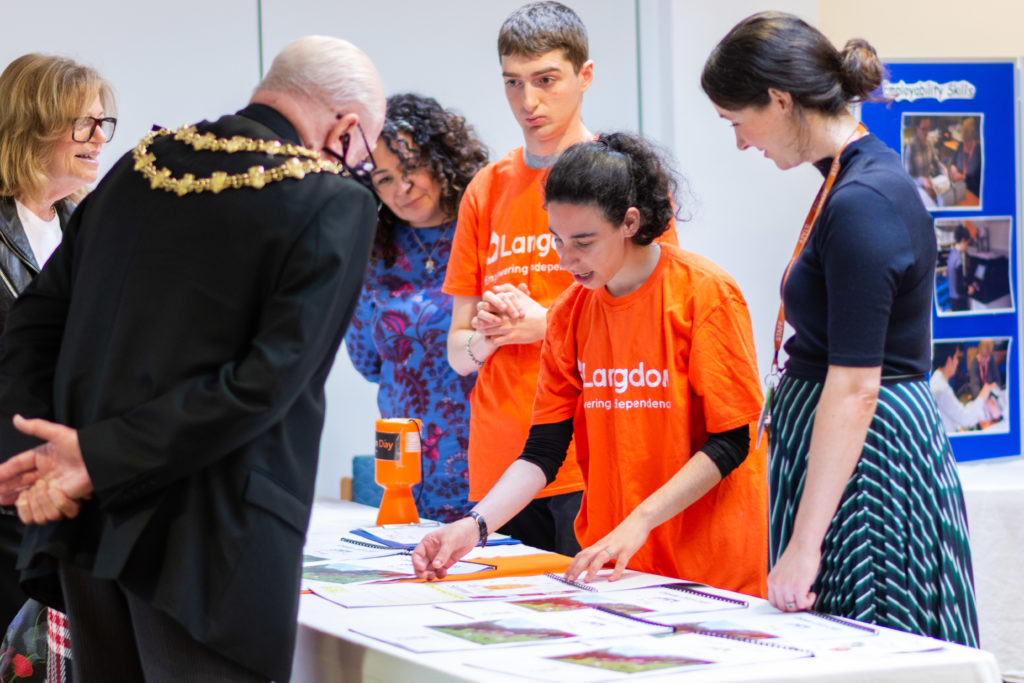
At a joyful launch event which took place at Heathlands
Village, in the presence of Trevor Holt Mayor of Bury, the calendars were
presented for sale to the public for the first time, by students and residents.
Rebecca continued “from creating the artwork together to the students printing
and binding the calendars – it has been a huge success.”
The calendars are priced at £7 and are available to purchase
from either Heathlands Village Shop or Langdon College and the proceeds will be
split between the charities.
A single portable and light weight device, Connect & Learn is
the newest way for low vision learners
to access the curriculum. Unlike many specialist VI devices, Connect &
Learn centres around a popular mainstream Windows 10 tablet – Microsoft’s
Surface Pro. SuperNova Magnifier comes included as standard, along with a large
print wireless keyboard, a folding stand and a backpack.
Place the tablet on the stand and
Connect & Learn acts as a digital magnifier. Place a document under the
built in camera and students can: magnify the document, zoom in using their
fingers on the touchscreen, add a colour scheme, rotate or lock the image. They
can even save the image to add to their work or to explore again at home.
Choose the Connect & Learn
package with SuperNova’s speech included and your student can tap the screen
and hear the words on the document read aloud. And the scan and read feature is
impressively accurate. Send the text to a Word document, move fingers to the keyboard
and Connect & Learn becomes a Windows 10 laptop complete with SuperNova’s
full set of magnification and colour enhancing tools.
Connect wirelessly to the interactive
whiteboard and low vision learners, can ‘see’ and magnify the whiteboard. Again
adjust colours, zoom in, take photos – Connect & Learn doesn’t need an
extra & expensive camera that points at the board so your partially sighted
student isn’t forced to sit at the front of the class. [We also know IT skills
aren’t always readily available in school, so we’ve recently released a free whiteboard wizard download to
help you connect to the whiteboard.]
As with all of Dolphin’s
products, Connect & Learn gives direct access to browse and download from
the RNIB Bookshare Education collection of more than 320,000 textbooks.
[Contact the RNIB to get your school’s free login.]
There are also a couple of other
Connect & Learn features that teachers tell us are worthy of note. The
Surface Pro charger connects magnetically, so it’s super easy for partially
sighted students to plug in the power. And the tablet weighs less than 2kg – so
much lighter to move between classes than your typical VI solution. It’s also
worth saying that because Connect & Learn is built on Windows 10 and uses MS
Office products, students are developing their essential IT skills for life
outside of school.
Connect & Learn is best
summarised by a young VI gentleman I recently met in year 8 at secondary school
in the Midlands. “With Connect & Learn I don’t feel different!”
I’ve always loved animals. Back home in Lithuania, my house was filled with cats, dogs, rabbits, spiders and snakes! I’ve always wanted to be a veterinary surgeon even from a small child; my first job was working with horses.
At the time of my accident, I was on my way to meet my boyfriend when I was hit by a car. It left me with no use of my legs and small movement in my hands and neck. Due to my experience working with animals, I understood what it was to have a spinal cord injury. I was familiar with what it looked like to have this type of injury. Most of the time, we would put the animal to sleep if this happened. My first reaction when I found out that I was now paralysed was to get on with it. I needed to deal with this new situation and face it.
I was in hospital for about six months and transferred to Stanmore as soon as I was stabilised. Whilst I was in Stanmore, my Occupational Therapy team introduced me to the Aspire’s Assistive Technology Programme. I wanted to be able to use a computer; I wanted to be able to do something by myself.
Andrew, Aspire’s Assistive Technology Manager, showed me how to use a SmartNav and Dragon. I found SmartNav quite interesting. I was able to control a mouse using my head. When I first tried it felt like something out of a science fiction movie. After a couple of sessions, I was able get to grips with it pretty quickly. The equipment plus a laptop was left with me inbetween sessions so I was able to do lots of practice on my own. I was quickly using it to communicate with my friends, read and send emails. Andrew also showed me a program where I was also able to try drawing using the computer. It made me realise how many tools were actually out there.
I knew that when I finally got out of hospital and home, I would want the same set up. Whilst I waited for it to arrive, I used the EVA Facial mouse which I also tried with Andrew whilst I was in hospital. This uses my facial expressions to operate my computer. I’ve now got a SmartNav at home and with it I’m able to communicate with friends and family, use Facebook, email.
I’ve also been able to do some online training as well. I don’t think I will ever be able to go back to being a veterinarian surgeon but it will always be an interest of mine.
SeeAbility’s specialist teams working to reduce isolation and promote education opportunities to ensure that people with learning disabilities, autism and sight loss are able to access the latest technology to get connected and grow their independence.
Introducing voice activated home assistants, like Amazon’s Echo Dot, opens up whole worlds of possibilities for the people we support to live with greater independence. Using the Echo Dot is one of the easiest ways for someone with sight loss to verbally access the internet and gain immediate auditory response. It helps people do everything from turning on their favourite music to searching the internet for information and sharing ideas with others. It’s hugely empowering and gives individuals greater control in their lives.
Group activity and skills sessions at the Millennium Centre in Surrey have taken on a new energy and are far more interactive since the introduction of the Echo Dot. This new gadget has transformed everything from our music workshops to keep fit sessions.
Learning to make voice commands has taken time and a lot of support from Our Vision Rehabilitation and Speech and Language Therapy teams. At first the people we support had to learn how to ask short, factual questions that that could be deciphered by the Echo Dot. Some people may have struggled with getting their words out in time but everyone enjoys having their questions answered so they persevered.
David and Anne use an Echo Dot to choose music in their Book Club session
Sessions now offer a more inclusive experience since the Echo Dot has been embedded. In fact, our volunteers and specialist teams can engage more with the people they are supporting now that the voice activated technology is on hand to offer up answers to tricky questions. Workshops have more spontaneous interaction and people are developing confidence to lead conversations.
Anne says: “With Alexa it means you can hear lots of different types of music in the same session. We all get to request what we want on it. It’s made our music slot so much more fun.”
David, who has a love of folk and blue grass music, uses Alexa to play obscure tracks as part of his music session. He says: “Alexa helps me find rare tracks and I enjoy hearing and singing along with my favourite songs and sharing them with my friends. It brings us closer.”
Trainees at The Hamlet at Three Sisters near Wigan were delighted to welcome the Earl of Wessex on 7th November, when he officially opened The Hamlet’s new facilities. Although an exceptionally wet day, Prince Edward was given a very warm welcome as Trainees enthusiastically showed him around and treated him to Afternoon Tea in the cafe.
Trainees also performed a live piece of music that they had produced for their Duke of Edinburgh Award. The Ian Karten Charitable Trust provided funding to establish Lakeside Printing at The Hamlet, The Earl was very interested in the Karten Centre and the work-related opportunities available to trainees.
Dawn Green – Karten Network and Development Co-ordinator
We use cookies on our website to give you the most relevant experience by remembering your preferences and repeat visits. By clicking “Accept All”, you consent to the use of ALL the cookies. However, you may visit "Cookie Settings" to provide a controlled consent.
This website uses cookies to improve your experience while you navigate through the website. Out of these, the cookies that are categorized as necessary are stored on your browser as they are essential for the working of basic functionalities of the website. We also use third-party cookies that help us analyze and understand how you use this website. These cookies will be stored in your browser only with your consent. You also have the option to opt-out of these cookies. But opting out of some of these cookies may affect your browsing experience.
Necessary cookies are absolutely essential for the website to function properly. These cookies ensure basic functionalities and security features of the website, anonymously.
Cookie
Duration
Description
cookielawinfo-checkbox-analytics
11 months
This cookie is set by GDPR Cookie Consent plugin. The cookie is used to store the user consent for the cookies in the category "Analytics".
cookielawinfo-checkbox-functional
11 months
The cookie is set by GDPR cookie consent to record the user consent for the cookies in the category "Functional".
cookielawinfo-checkbox-necessary
11 months
This cookie is set by GDPR Cookie Consent plugin. The cookies is used to store the user consent for the cookies in the category "Necessary".
cookielawinfo-checkbox-others
11 months
This cookie is set by GDPR Cookie Consent plugin. The cookie is used to store the user consent for the cookies in the category "Other.
cookielawinfo-checkbox-performance
11 months
This cookie is set by GDPR Cookie Consent plugin. The cookie is used to store the user consent for the cookies in the category "Performance".
viewed_cookie_policy
11 months
The cookie is set by the GDPR Cookie Consent plugin and is used to store whether or not user has consented to the use of cookies. It does not store any personal data.
Functional cookies help to perform certain functionalities like sharing the content of the website on social media platforms, collect feedbacks, and other third-party features.
Performance cookies are used to understand and analyze the key performance indexes of the website which helps in delivering a better user experience for the visitors.
Analytical cookies are used to understand how visitors interact with the website. These cookies help provide information on metrics the number of visitors, bounce rate, traffic source, etc.
Advertisement cookies are used to provide visitors with relevant ads and marketing campaigns. These cookies track visitors across websites and collect information to provide customized ads.